Restoration CRM software
Restoration CRM software for overnight calls and insurance documentation. The 3 a.m. call is answered, every photo and reading is kept on the job, and added scope is logged as the job grows.
23
7
47
Rivera
Martinez Residence
Water mitigation Cat 3
Oak Tower Apt 412
Fire restoration
Chen Family
Mold remediation
Hartford Office Bldg
Sprinkler damage Cat 1
Restoration software for scheduling, dispatch and invoicing
Your work starts with a 3 a.m. call and ends with a deductible and a rebuild. This water damage restoration software keeps the claim details, photos and invoices on the job, for one crew or several.
Restoration scheduling software
Monitoring visits during dry-down sit on the calendar for each job, and the homeowner gets a reminder before each one.
Restoration dispatch software
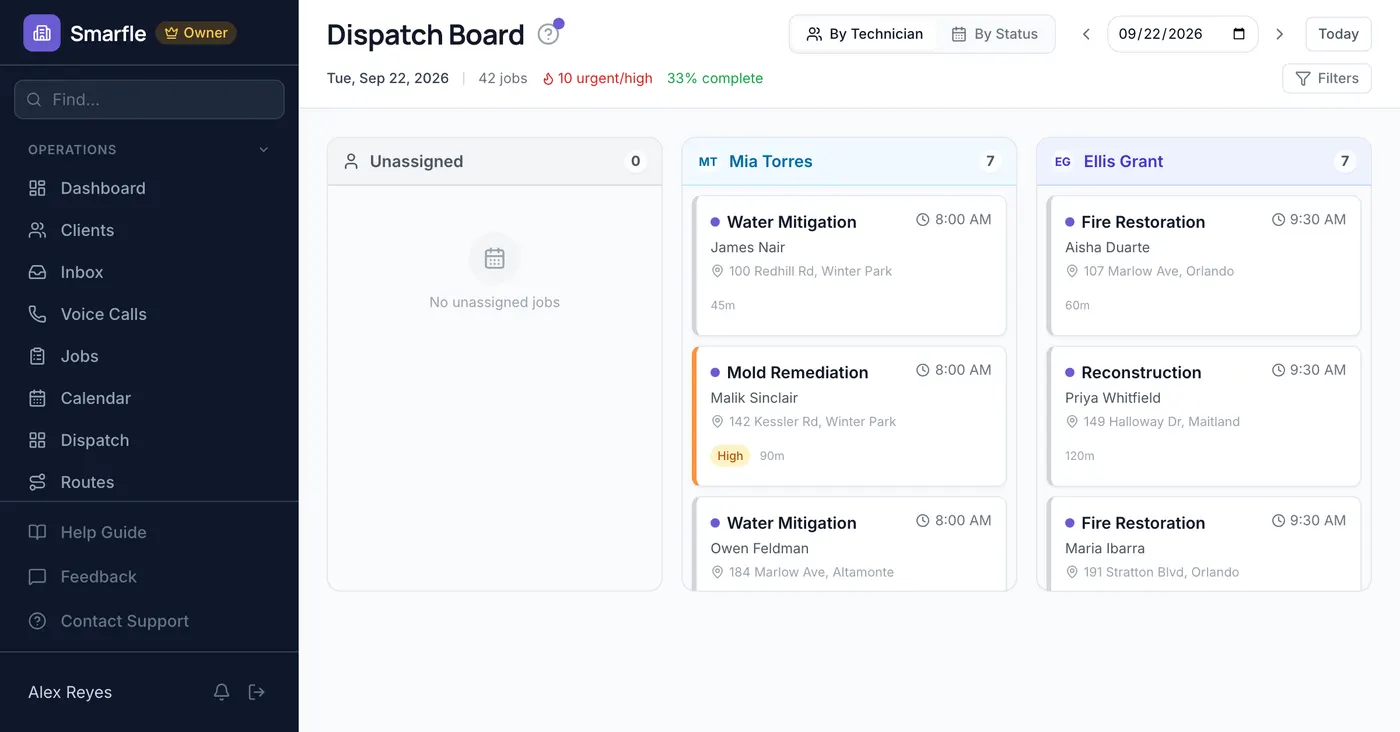
The dispatch board shows every crew's day, so the 3 a.m. water loss goes to whoever is free and the route reorders.
Restoration billing software
Commercial property managers on a standing service agreement pay from a saved card on their cycle, with no chase.
Restoration invoicing software
Bill the deductible and each stage as separate invoices from the job's lines, and the homeowner pays from a payment link.
Calls, reviews and your restoration website in one account
Restoration call tracking
Water calls come at night and go to whoever answers. Each call is recorded, and a missed one is texted back at once.
Reviews and Google Business Profile
Homeowners are asked for a review after the rebuild, and adjusters and neighbors notice those ratings when they search.
Website and lead follow-ups
Emergency requests from your website open a job right away, and rebuild estimates get automated follow-ups three and seven days later.
Restoration CRM plans that grow with your crews
All plans include a 14-day free trial. No credit card required.
Starter
Small teams adding tools and growth
- Up to 5 users (1 owner + 4 techs)
- Up to 2,000 clients
Professional
Growing service businesses
- Up to 10 users
- Up to 5,000 clients
SMS, email, AI, and voice are billed pay-as-you-go. See every plan and usage rate →
Three restoration problems Smarfle fixes
Weak documentation
Technicians photograph every stage onto the restoration job, and the claim number, carrier, adjuster and moisture readings sit on the material form.
Overnight calls to voicemail
Set the night hours to text back or take the call, so a flooded basement gets an answer at 3 a.m. instead of a recording.
Scope that grows without billing
Added work goes on the job as it happens, with a signed estimate for larger changes, so the final invoice matches the work.
Four ways to answer restoration calls
Pick how the number behaves overnight and on weekends. Every call is logged on the customer, whether it is answered, texted back or booked by the AI.
Plain forwarding
$0.04/min
Rings your phone, and every call is logged as answered or missed.
Forward with call tracking
$0.10/min
Rings your phone; calls are recorded, transcribed and saved to the customer.
Busy message and text-back
~$0.05/call
Plays your message, then texts the caller. Replies land in your Inbox.
AI receptionist
$0.25/min
The AI answers, qualifies the caller and books the job, day or night.
Spam screening comes with every mode. Unknown callers press a key before the call connects, and screened calls cost nothing. How spam screening works
Curious how the AI option sounds? Call (866) 355-9645 and try booking a consultation with it.
Restoration companies Smarfle fits
Independent restoration companies doing water, fire and mold work for homeowners.
A good fit if
Probably not a fit if
Everything in Smarfle's restoration job management software
A homeowner page for the claim
One link shows the homeowner their job photos, invoices, receipts and shared documents, and lets them pay the deductible.
Copies for adjusters and tenants
Add a tenant, property manager or adjuster to the account, and they get email copies of invoices and job updates.
Update emails you stop rewriting
Save daily-update and dry-down-complete emails as templates with merge fields, and send one from the job in two taps.
Restoration CRM software for the follow-through
The water is the urgent part. Checklists, priced hours, the deductible and a second office are what decide whether the job pays.
Mold and rebuild checklists
Save containment, drying and rebuild steps on each service, and every job opened under it carries the checklist.
Technician hours priced
Technicians log minutes on each job at their own hourly rate, so labor shows beside equipment and materials.
Deductible collected without a chase
Send the deductible invoice with a pay link, and overdue invoices flag themselves with an aging view by customer.
A second office for the next county
On Starter and above, a second location gets its own crews, schedule and phone number, with one picker between them.
Get more jobs for your restoration business
Restoration lead generation
Water damage is called in within the hour. It is awarded to whoever responds. Smarfle sends you the loss type and the property while the homeowner is still deciding, so you are the first call back rather than the third. One mitigation job pays for a great many leads.
Flat pricing per accepted lead
Restoration leads run about $65 each. You see the job and ZIP first, then accept or pass free, with no lead budget or bidding.
When leads start
Google needs time to rank the pages we add around you, so plan for up to two months. You pay per lead, never for waiting.
Requests arrive pre-qualified
Each request comes with the customer's answers to “What happened?” and “When did it start?”, so your callback quotes the job instead of interviewing.
Fair by design
Your existing customers and repeat requests are always free, and a bad lead can be disputed for a wallet refund.
What restoration owners ask about insurance work
Does Smarfle file the claim or talk to the carrier?
Does it replace Xactimate?
Can I see which dehumidifier is at which address?
We sub out the rebuild. Can those crews log in?
How do we compare to Encircle or DASH?
What sets the monthly price of this restoration software?
Can our restoration billing flow into QuickBooks?
Can we invoice the carrier and the homeowner separately?
More restoration software features
Related industries
Other contractor trades with a similar workflow. See CRM for contractors
General contractor CRM
Rebuild projects with subs and staged billing.
Roofing CRM
Storm damage work with photos for the insurance file.
Plumbing CRM
Burst pipes are where most water jobs begin.
Switching to Smarfle from another restoration CRM?
Your customers, services and past jobs are imported for you, then each technician gets a login. Open jobs keep running during the move.
- Comes across
- Customers, services with prices, past jobs with their dates and prices, and products in stock.
- Set up fresh
- Recurring plans and saved cards, since card numbers never move between systems.
- Stays in your old system
- Past invoices, so export them as a file before you cancel.
Why businesses stay
Who you are buying from
Ihor Lavrenenko, founder of Smarfle and author of Rank, Ring, Repeat, a local SEO guide for business owners, puts his name on this product after helping hundreds of local businesses grow. Ask for a feature or a change and it is often built by the next day.
Try Smarfle free for 14 days
No credit card. Import your customers and open the next water job today.
14 days free · No credit card · Cancel anytime