Updated
Event planning CRM software
Event planning CRM software for proposals, deposits and the details every event carries. Vendor confirmations sit in fields on the client, files share from one folder, and the balance bills on time.
9
4
$142k
Saturday
Anderson Wedding
200-person wedding
Tech Co Holiday Party
Corporate event 150pax
Garcia Engagement
Engagement party 40pax
Williams Gala
Nonprofit gala 300pax
Event planner CRM and invoicing software
You hold vendors, timelines and budgets for every client. Smarfle keeps them on the client record, collects deposit payments and bills the balance on time.
Event planning scheduling software
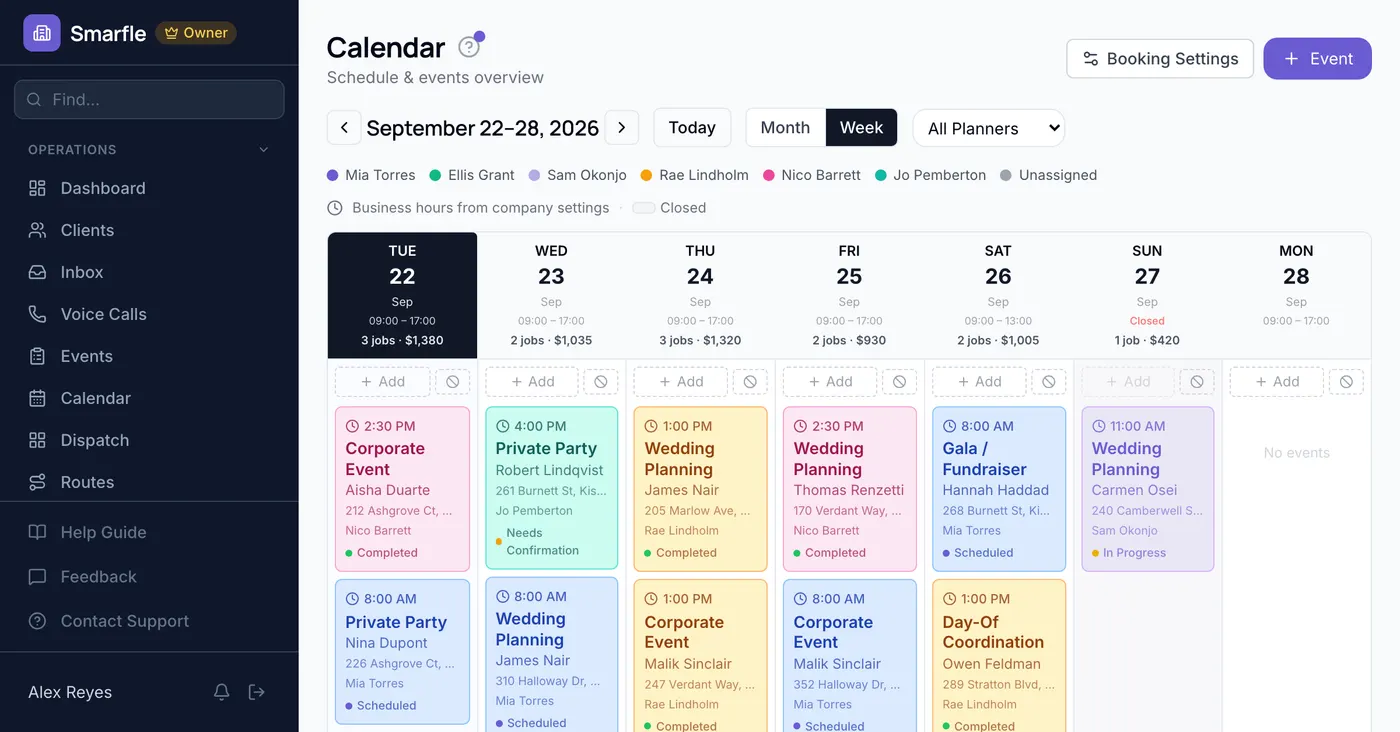
Consultations and site visits book into open times online, and each event sits on its date with the planner who owns it.
Event planning billing software
Retainers and payment plans charge the client's saved card on the dates you set, each with its own invoice.
Event planning invoicing software
Invoices build from your package and add-on lines with the deposit credited, and clients pay online by card from a link.
Calls, reviews and your event planning website in one account
Event planner call tracking
Couples and companies call several planners. Each call shows which ad or page brought it in, and the ones you miss are texted back.
Reviews and Google Business Profile
Couples and companies are asked for a review after the event, and future clients read those before a consultation.
Website and lead follow-ups
Inquiries through your website arrive with the date and guest count, and proposals nobody signed get automated reminders.
Event planner software plans that grow with your business
All plans include a 14-day free trial. No credit card required.
Starter
Small teams adding tools and growth
- Up to 5 users (1 owner + 4 techs)
- Up to 2,000 clients
Professional
Growing service businesses
- Up to 10 users
- Up to 5,000 clients
SMS, email, AI, and voice are billed pay-as-you-go. See every plan and usage rate →
Three event planning problems Smarfle fixes
Vendor confirmations that slip
Track each vendor's confirmation in custom fields on the client, and set a reminder before the cutoff date.
Timelines spread across documents
Save the run of show as a checklist on the service, so every event opens with the same sequence to tick off.
Budget talks at the worst moment
Proposals and contracts carry every line and the deposit, and the client signs before you book vendors, so the number is agreed early.
Four ways to answer event planning calls
Choose how the number answers while you are running an event. Missed calls get a text back or the AI, and each call lands on the client.
Plain forwarding
$0.04/min
Rings your phone, and every call is logged as answered or missed.
Forward with call tracking
$0.10/min
Rings your phone; calls are recorded, transcribed and saved to the customer.
Busy message and text-back
~$0.05/call
Plays your message, then texts the caller. Replies land in your Inbox.
AI receptionist
$0.25/min
The AI answers, qualifies the caller and books the job, day or night.
Spam screening comes with every mode. Unknown callers press a key before the call connects, and screened calls cost nothing. How spam screening works
Curious how the AI option sounds? Call (866) 355-9645 and try booking a consultation with it.
Event planners Smarfle suits
Independent planners and small teams handling weddings and corporate events.
A good fit if
Probably not a fit if
Everything Smarfle does for an event planner
Questions about your events, answered
Ask Smarfle answers questions about your own events and invoices in plain language, and proposes changes you confirm first.
Floor plans and agreements on file
Upload vendor agreements and floor plans to the client's private folder, and share one file when it is needed.
Profit on every event
Vendor costs and your hours post to each event beside the invoice total, with the profit worked out.
Event planning CRM on the day itself
Planning is mostly follow-through. Billable hours, an edit history, saved emails and a second office help the business side keep up.
Planner hours that get billed
Planners log minutes on each event at their hourly rate, and billable time carries onto the invoice.
When two people remember it differently
Every note and status change on an event carries the person and the time, so the record settles the question.
Emails you stop rewriting
Save the booking welcome and final-details emails as templates with merge fields, and send one in two taps.
A second office for another city
On Starter and above, a second location gets its own planners, calendar and phone number, with one picker between them.
Get more clients for your event planning business
Event planning lead generation
One wedding is worth more than most planners spend finding clients all year. Smarfle finds the couples and companies searching in your area and sends the event type, the date, and the size with the request. You take the ones that fit your calendar.
Flat pricing per accepted lead
Event Planning leads run about $30 each. You see the job and ZIP first, then accept or pass free, with no lead budget or bidding.
When leads start
Google needs time to rank the pages we add around you, so plan for up to two months. You pay per lead, never for waiting.
Requests arrive pre-qualified
Each request comes with the customer's answers to “What kind of event?” and “How many guests?”, so your callback quotes the job instead of interviewing.
Fair by design
Your existing customers and repeat requests are always free, and a bad lead can be disputed for a wallet refund.
What planners ask before choosing event planning software
Related industries
Other professional service firms with a similar workflow.
Photography CRM
Wedding and event shoots booked with retainers.
Catering CRM
Event food service with headcounts and deposits.
Marketing agency CRM
Client retainers, proposals and recurring billing.
Switching to Smarfle from another event planning CRM?
Your clients, packages and past events come across with our help, and upcoming events keep their dates. Each planner gets a login.
- Comes across
- Clients, services with prices, and past projects with their dates and prices.
- Set up fresh
- Recurring plans and saved cards, since card numbers never move between systems.
- Stays in your old system
- Past invoices, so export them as a file before you cancel.
Why businesses stay
Who you are buying from
Ihor Lavrenenko, founder of Smarfle and author of Rank, Ring, Repeat, a local SEO guide for business owners, puts his name on this product after helping hundreds of local businesses grow. Ask for a feature or a change and it is often built by the next day.
Try Smarfle free for 14 days
No credit card. Import your clients and book the next consultation today.
14 days free · No credit card · Cancel anytime