Interior design CRM software
Interior design CRM software for the design hours that quietly go unbilled. Time logs against the project as it happens. Vendor orders, approvals, and revision rounds all sit on one record.
8
12
$18,400
3
Sullivan Penthouse Renovation
Full Interior Redesign
Birchwood Dental Office
Commercial Space Design
Kim Residence Living Room
Room Refresh Package
Harborview Restaurant
Hospitality Design Concept
Software an interior design business runs on
Design hours feel informal, which is precisely why they never make it onto an invoice. Smarfle logs that time against the project as it happens, keeps vendor orders and approvals on one record, and documents revision rounds before they eat the margin. One designer or a full studio.
Interior design scheduling software
Your install day needs the client, the delivery and the trades in one room on one morning. Smarfle dates the install against when goods actually arrive and blocks all three days for everyone, so a slipped shipment moves one thing instead of three.
Learn moreInterior design billing software
Placing an order for a client means carrying their purchase on your account until they decide to pay you back. Smarfle makes the deposit a condition of the project, so the order and the payment become one decision rather than two conversations.
Learn moreInterior design invoicing software
You fund your client's furniture until the procurement deposit arrives. Smarfle invoices that deposit as its own document with a payment link and keeps supplier costs on the project, so the final reconciliation is a report rather than an evening with receipts.
Learn moreThe growth side, built in
Design inquiry tracking
Consultation inquiries carry whole-home budgets. Every call is logged with the rooms and style discussed, ready for the proposal.
Reviews and Google Business Profile
Finished-room photos in reviews sell design better than any pitch. Requests go out at the reveal, when clients are happiest.
Website and lead follow-ups
Portfolio-driven inquiry forms qualify budget and scope, and follow-ups nurture the projects waiting on renovations to finish.
CRM plans that grow with your design business
All plans include a 14-day free trial. No credit card required.
Solo
Sole operators getting started
- 1 user
- Up to 500 clients
- 1 GB storage
- Public booking link + calendar
- Client management
- Work orders with photos
- Invoices + Stripe payments
- Voice AI receptionist (usage-based)
- AI drafts + work order summaries
- GMB rank tracking + Search Console
- GBP Posts + Dashboard
- API access + webhooks
- Mobile PWA + CSV import/export
Starter
Small teams adding tools and growth
- Up to 5 users (1 owner + 4 techs)
- Up to 2,000 clients
- 3 GB storage
- 2 branch locations
- Everything in Solo
- Website builder + AI content
- Your own domain on that website
- Branded client portal
Professional
Growing service businesses
- Up to 10 users
- Up to 5,000 clients
- 5 branch locations
- 10 GB storage
- Everything in Starter
- Manager role (up to 2)
- 50 saved email templates
Business
Multi-location operations
- Up to 30 users
- Up to 10,000 clients
- 10 branch locations
- 20 GB storage
- Everything in Professional
- Manager role (up to 5)
- Priority support
SMS, email, AI, and voice are billed pay-as-you-go. See full pricing breakdown →
What an inefficient design business looks like
Designers give away the part of the work they enjoy most. Thinking time feels informal, so it never reaches an invoice and the project quietly subsidises itself.
Vendor coordination creates constant chaos
Furniture orders, fabric samples, contractor schedules, and delivery windows all need to align for an installation. When vendor details live in separate email threads, things arrive late, in the wrong color, or not at all.
Design time goes unbilled because it feels informal
Sourcing materials, creating mood boards, attending site visits, and communicating with clients all take hours. Without logging this time, your design fees never reflect the actual work you invest in each project.
Client revisions stretch projects beyond profitability
Clients change their mind about finishes, furniture, and layouts. Each revision triggers new sourcing, vendor communication, and design updates. The project scope grows while the fee stays the same.
Every interior design call, handled your way
Vendor and client calls both log to the project record. You decide what happens when you cannot answer rather than leaving it to voicemail.
Plain forwarding
$0.04/min
Just rings your phone. Every call logged as answered or missed.
Forward with call tracking
$0.10/min
Rings your phone. Recorded, transcribed, summarized, and logged to the customer record.
Busy message + text-back
~$0.05/call
Plays your message, hangs up, and texts the caller. Replies land in your Inbox as leads.
AI receptionist
$0.25/min
The AI answers, qualifies the caller, and books the job. Great after hours if you want it.
Spam screening is included in every mode
Turn it on and unknown callers hear one sentence and press a key before the call connects. Dialer software does not press keys, so it never reaches you. How screening works
- Your customers skip it. Known clients and callers on mobile numbers are never screened.
- You are not billed for it. Screened, silent, and blocked calls cost nothing.
- One blocklist. Block a number once and it stops calling and texting.
Curious how the AI option sounds? Call (866) 355-9645 and try booking a consultation with it.
How an interior design project flows through Smarfle
A design project runs from the first consultation to final installation, with the hours captured as they happen.
- 1
Lead from referral or social
A referral or a social enquiry opens a client record carrying project scope, style preferences, and budget tier.
- 2
Discovery + design fee
Calendar slot for the in-home consult. Custom fields capture room counts, timeline, and primary deliverables.
- 3
Contract + sourcing tracked
Contract via e-sign, design fee via Stripe payment link, project becomes a work order. Vendor purchases logged as expenses.
- 4
Install + walk-through
Job checklist for delivery and install steps, photos for portfolio, time tracking per project, punch list captured for fixes.
- 5
Final invoice + review + portfolio share
Final invoice with markup on items via Stripe payment link, review request after install, photos used in marketing.
Same flow for every interior design business, only the terminology and details change.
Smarfle fits some design businesses better than others
Billable design time and vendor orders decide it. Hourly advice with no procurement will use less.
We built this for you if...
Tap the ones that resonate
This probably isn't for you if...
And that's okay
Everything Smarfle does for a design business
The design is the visible part. Running projects, billing hours and orders, and winning the next one take just as long.
Project phase dashboard
See every project with current phase, milestones, and deliverables. Filter by designer, project type, or status to manage your active workload effectively.
Procurement tracker
Track every vendor order with item, vendor, order date, expected delivery, and status. Know exactly where every piece of furniture and material is at all times.
Design review portal
Post mood boards, material palettes, and furniture selections for client review. Clients approve or request changes through the portal with documented feedback.
Installation planning
Track contractor schedules, delivery windows, and site preparation tasks for each installation. Coordinate timing so everything arrives and installs on schedule.
Interior design CRM steps nobody writes down
Give an install to an assistant and you find out immediately which steps only ever lived in your head. A service carries a checklist you build once, so every job created from it shows the same steps and they get ticked off on site. The date goes on a calendar colored by whoever owns it, the client gets an invite file emailed to them, and the dates you promised to chase send their own reminder.
A studio scales when the next person can run the job exactly the way you would.
Measure, protect, install, sign off
Field measure, site protection, the install day and the closing walkthrough make up the part of a project that cannot drift. That run of items lives on the service, so any project drawn from it shows the same list for you or an assistant to complete.
Installs and walkthroughs, colored by designer
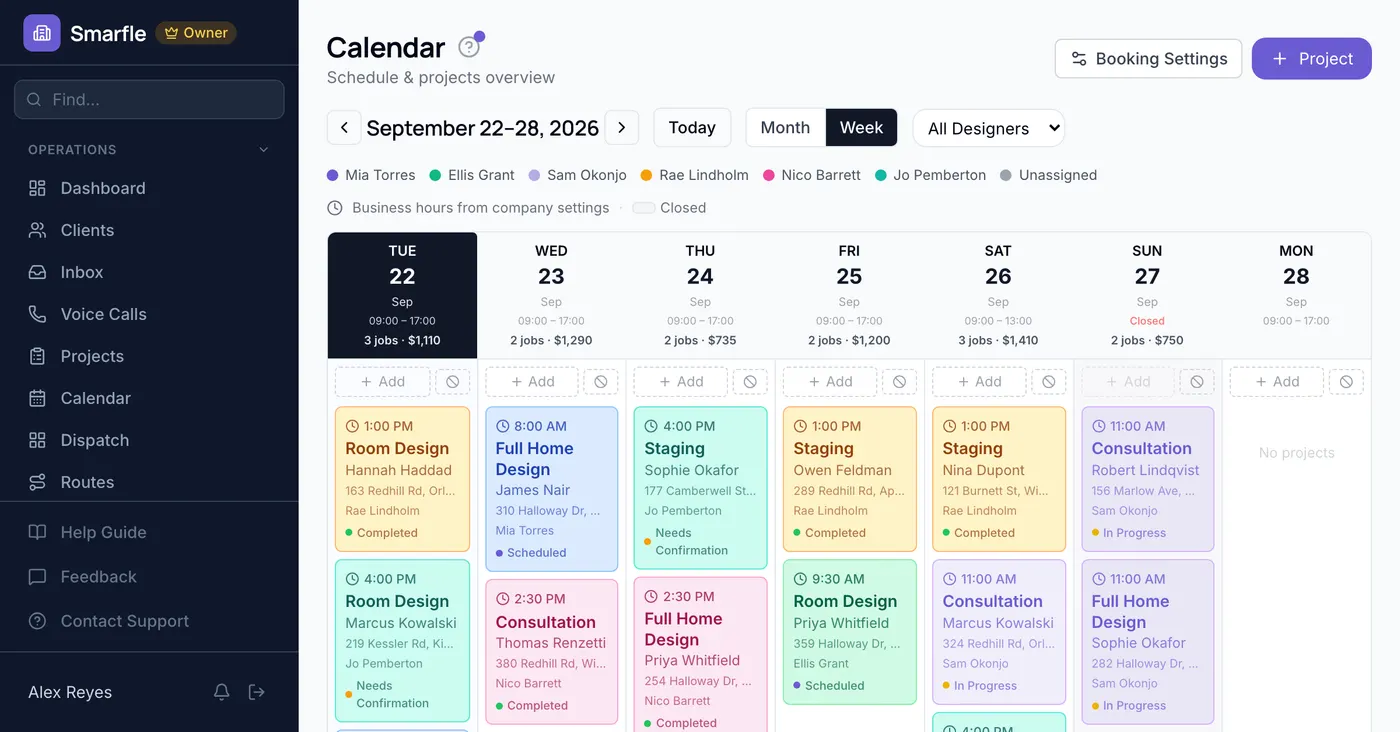
Presentations, site visits and install days sit on one board, each designer in a separate shade, readable a month at a time or a week at a time. The client also receives the date as a file that drops into their calendar rather than into an email thread.
The follow up you promised, dated
Set a reminder on the date you gave the client and it goes out in advance as a text or an email, without you checking a list to trigger it. Completing a job asks whether to schedule another, so a promise turns into a date instead of an intention.
Vendor sheets that update themselves
Seven different changes here fire an outgoing message, signed and retried when the other side is unreachable. A vendor ordering sheet or a bookkeeping tool picks up what happened without you copying anything across.
Get more clients for your design business
Interior design lead generation
Whole-home projects are worth a year of one-room jobs. Smarfle finds the homeowners searching for a designer near you and sends the scope and the space with the request. Take the projects worth your hours and pass the rest, free.
Flat pricing per accepted lead
Interior Design leads run about $35 each. You see the job and the ZIP first, then accept or pass free. No monthly lead budget, no bidding wars.
When leads start
We expand the directory around every business that joins, and Google needs time to rank new pages, so plan for up to two months before leads ramp up. You pay per lead, never for waiting. A Google Business Profile with real reviews brings them sooner.
Requests arrive pre-qualified
Every quote request already answers what needs designing and what do you want, so your callback quotes instead of interviews.
Fair by design
Your existing customers and repeat requests are always free, and a bad lead can be disputed with a refund to your wallet.
Design studio owners ask us this
Related industries
Other trades using Smarfle to run their book of business.
Switching to Smarfle from another interior design CRM?
Orders placed and an install date already promised are why designers stay on software they have outgrown. Someone here does the switch for you, drawing your client roster and price list into a CSV and sending each designer an invitation of their own, and our desks are in the US.
Why businesses stay
Who you are buying from
We answer requests the same day. If your business needs a new feature, or an existing one changed, it gets built fast, often by the next day. Ihor Lavrenenko puts his name on this product: he has helped hundreds of local businesses grow, and Smarfle is how that experience shows up in your operation every morning.
Ready to run your interior design business from one place?
Join service businesses that book more jobs, get paid faster, and grow their reputation with Smarfle.
14 days free · No credit card · Cancel anytime