Fire protection CRM software
Fire protection CRM software with the inspection calendar as its backbone. Recurring inspections regenerate by device and building. Reports are delivered from the phone on site and deficiencies become jobs rather than notes.
96
34
11
$14,800
Metro Office Tower
Quarterly Sprinkler Inspection
Bella Italia Restaurant
Annual Hood Suppression Test
Lakewood Apartments
Fire Alarm Panel Repair
Sunrise Medical Center
Extinguisher Annual Service
Software a fire protection business runs on
Smarfle regenerates inspections by device and building, which is the only reason work scheduled years out still happens. Reports are delivered from the phone before the technician leaves the site, and every deficiency becomes a job that cannot be quietly dropped. One inspector or a full team.
Fire protection scheduling software
Your calendar is set by code, not by you, and every building runs to a different clock. Smarfle records each site's intervals and surfaces the work inside its window, so a missed inspection is something you avoid rather than something you discover.
Learn moreFire protection dispatch software
Your inspectors cover patches that overlap badly because work is handed out by who is free. Smarfle assigns on actual proximity and lets deficiencies be recorded at the riser, so findings reach the record the same hour instead of being typed up on Friday.
Learn moreFire protection billing software
You inspect the same buildings every year and bill them like they are new customers. Smarfle holds each building's cadence and terms on the account, so a multi-site customer is billed as one relationship rather than a stack of unconnected jobs.
Learn moreFire protection invoicing software
You hand over a compliance report and send the bill separately, which makes the bill look like an interruption. Smarfle keeps the signed inspection and the photos on the job so both arrive in one email, with each system you tested as its own line.
Learn moreThe growth side, built in
Fire protection call tracking
Facility managers call about failed inspections and deadlines. Tracked calls keep every compliance detail on record and tie inquiries to the contracts they become.
Reviews and Google Business Profile
Property managers vet fire protection vendors online before calling. Post-inspection review requests build the credibility that wins multi-site contracts.
Website and lead follow-ups
Inspection request forms feed the CRM with building details attached, and follow-ups chase the quotes that facilities teams sit on until the deadline looms.
CRM plans that grow with your fire protection business
All plans include a 14-day free trial. No credit card required.
Solo
Sole operators getting started
- 1 user
- Up to 500 clients
- 1 GB storage
- Public booking link + calendar
- Client management
- Work orders with photos
- Invoices + Stripe payments
- Voice AI receptionist (usage-based)
- AI drafts + work order summaries
- GMB rank tracking + Search Console
- GBP Posts + Dashboard
- API access + webhooks
- Mobile PWA + CSV import/export
Starter
Small teams adding tools and growth
- Up to 5 users (1 owner + 4 techs)
- Up to 2,000 clients
- 3 GB storage
- 2 branch locations
- Everything in Solo
- Website builder + AI content
- Your own domain on that website
- Branded client portal
Professional
Growing service businesses
- Up to 10 users
- Up to 5,000 clients
- 5 branch locations
- 10 GB storage
- Everything in Starter
- Manager role (up to 2)
- 50 saved email templates
Business
Multi-location operations
- Up to 30 users
- Up to 10,000 clients
- 10 branch locations
- 20 GB storage
- Everything in Professional
- Manager role (up to 5)
- Priority support
SMS, email, AI, and voice are billed pay-as-you-go. See full pricing breakdown →
What an inefficient fire protection business looks like
Compliance work is scheduled a year out, so the reminder has to survive twelve months of everything else, and most reminders do not.
Compliance deadlines are scattered across spreadsheets
Annual, semi-annual, and quarterly inspection schedules vary by property type and jurisdiction. Tracking hundreds of deadlines in spreadsheets means some get missed, putting clients at risk of fines and your company at risk of losing the contract.
Inspection reports take days to deliver
Technicians complete inspections on paper forms, bring them back to the office, and someone types them up later. Clients wait days for reports they need immediately for their compliance files, and your team wastes hours on data entry.
Deficiency follow-ups get forgotten
An inspection reveals a faulty sprinkler head or expired extinguisher. The deficiency gets noted, but the follow-up repair never gets scheduled because it was buried in a paper report. The client calls angry weeks later when they realize the issue is still open.
Every fire protection call, handled your way
Calls from property managers land on the account with a recording and a transcript, so the request is written down before anyone calls back.
Plain forwarding
$0.04/min
Just rings your phone. Every call logged as answered or missed.
Forward with call tracking
$0.10/min
Rings your phone. Recorded, transcribed, summarized, and logged to the customer record.
Busy message + text-back
~$0.05/call
Plays your message, hangs up, and texts the caller. Replies land in your Inbox as leads.
AI receptionist
$0.25/min
The AI answers, qualifies the caller, and books the job. Great after hours if you want it.
Spam screening is included in every mode
Turn it on and unknown callers hear one sentence and press a key before the call connects. Dialer software does not press keys, so it never reaches you. How screening works
- Your customers skip it. Known clients and callers on mobile numbers are never screened.
- You are not billed for it. Screened, silent, and blocked calls cost nothing.
- One blocklist. Block a number once and it stops calling and texting.
Curious how the AI option sounds? Call (866) 355-9645 and try booking a consultation with it.
How a fire protection job flows through Smarfle
Inspections schedule themselves a year out. Here is what happens between the work order appearing and the report being delivered.
- 1
Inspection booked from contract
Recurring work orders generate the annual inspections for sprinkler, alarm, extinguisher, and hood systems. Each one appears on the schedule without anybody raising it.
- 2
Tech dispatched with inspection list
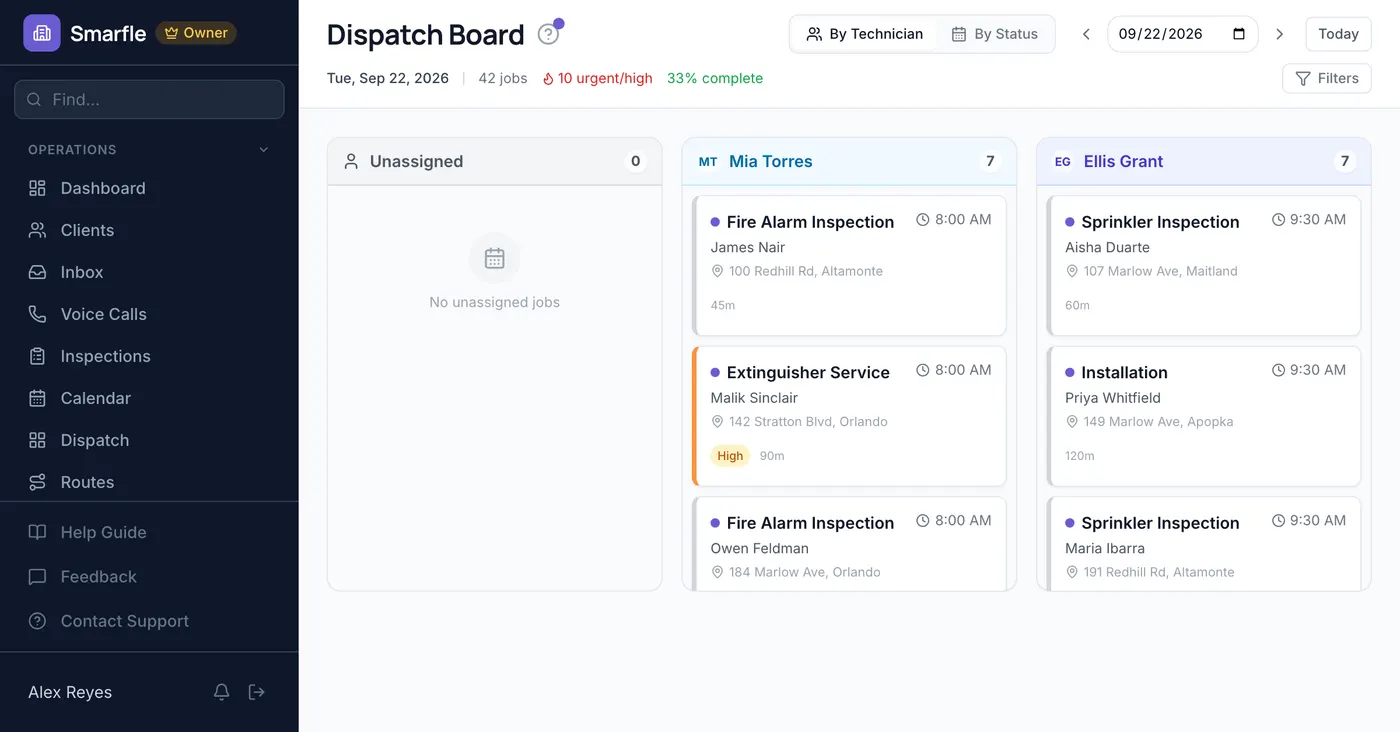
Route optimization for multi-property days. Tech sees system specs, prior deficiencies, and AHJ requirements via custom fields.
- 3
Inspection performed in field
Job checklist enforces NFPA-required test points, photos of each system, time tracking, and any parts replaced (extinguisher pin, fire-pump valve) drawn from inventory.
- 4
Deficiency report + repair scheduled
Failed items logged as separate work orders for follow-up repair. Customer signs the inspection certificate via e-sign on the tech's phone.
- 5
Annual contract bill + reminder for next year
Stripe Connect bills the annual contract. Maintenance reminders schedule next year's inspection automatically.
Same flow for every fire protection business, only the terminology and details change.
Smarfle fits some fire protection businesses better than others
If inspections repeat on a cycle you have to prove, this fits. One-off installs alone will not need it.
We built this for you if...
Tap the ones that resonate
This probably isn't for you if...
And that's okay
Everything Smarfle does for a fire protection business
The inspections are the work. Scheduling them, billing them, and winning the next building are the business around it.
Automated inspection scheduling
Set inspection frequencies per property and let the system generate work orders on schedule. Annual, semi-annual, and quarterly inspections never get missed.
Digital inspection checklists
Technicians complete inspection forms on their phone with pass/fail checkboxes, notes, and photos. Reports are available immediately instead of days later.
Deficiency tracking and follow-up
When a technician flags a deficiency, the system creates a follow-up repair job automatically. Track open deficiencies by property until every issue is resolved.
Compliance deadline calendar
The calendar view shows all upcoming inspections color-coded by urgency. Properties approaching their deadline are highlighted so your scheduler can prioritize them.
Every visit stays on the property record
Checklist results, deficiency photos and the notes an inspector leaves all sit on the property with a name and a time against them. When a fire marshal or an insurance auditor asks what happened at that building last year, you read it back instead of hunting for paperwork.
Fire protection software and the margin question
A work order in this trade has to carry more than a date and an address. It has to carry what the parts cost you, what the subcontractor cost you, and what the whole thing sold for. It has to carry the head or the extinguisher that came off the shelf to make the repair. The margin question is answered on that record or it is never answered at all.
Inspection work is priced thin, so the only safe place left to find margin is on the job record itself.
Heads, extinguishers and sub labor, costed
Sprinkler heads, extinguisher recharges and any hired inspector go down against the job one entry at a time, priced by the piece. Anything taken off your own shelf shows up carrying what you paid for it, and the finished job reports margin instead of revenue.
Stock checked as parts hit the job
Heads, pull stations, extinguishers and pipe fittings each carry an identifier, a cost, a sell figure and a live quantity on hand. Adding one to work verifies there is stock and takes it down, removing it restores the figure, and the short and empty items can be listed on their own.
Inspection notices worded identically every time
Property managers expect the same wording on every inspection notice, so build it as a template and let the merge fields pull in who the customer is, what was done and what is owed. Nothing leaves until you have looked at the resolved copy on the record.
Property managers talk to property managers
Inspection work moves through a small circle where one building manager vouches for you to another running a portfolio nearby. Issue the account a code, the discount comes off on its own, and the reward is attributed to whoever made the introduction.
Get more accounts for your fire protection business
Fire protection lead generation
One building on an inspection cycle is an annuity, not a job. Smarfle finds the property managers and business owners searching for fire protection near you and hands over the building type with the request. You quote work that recurs for as long as you keep the account.
Flat pricing per accepted lead
Fire Protection leads run about $40 each. You see the job and the ZIP first, then accept or pass free. No monthly lead budget, no bidding wars.
When leads start
We expand the directory around every business that joins, and Google needs time to rank new pages, so plan for up to two months before leads ramp up. You pay per lead, never for waiting. A Google Business Profile with real reviews brings them sooner.
Requests arrive pre-qualified
Every quote request already answers what do you need and what is driving it, so your callback quotes instead of interviews.
Fair by design
Your existing customers and repeat requests are always free, and a bad lead can be disputed with a refund to your wallet.
What inspection companies ask before renewal season
Related industries
Other trades using Smarfle to run their book of business.
Security & alarm CRM
Life-safety systems with recurring inspections and monitoring contracts. Same compliance cadence.
ExploreElectrical CRM
Wiring and panel work overlap. Shared estimate, dispatch, and permit workflow.
ExploreGeneral contractor CRM
Commercial build-outs need fire systems. Project scheduling and inspection sign-off overlap.
ExploreSwitching to Smarfle from other fire protection software?
Building records, device lists and the inspection dates hanging off them are what a switch puts at risk, so that import is prepared and loaded at our end rather than handed to you as a guide. Inspectors are given their own accounts in the same pass by US staff, who check the dates landed where they belong.
Why businesses stay
Who you are buying from
We answer requests the same day. If your business needs a new feature, or an existing one changed, it gets built fast, often by the next day. Ihor Lavrenenko puts his name on this product: he has helped hundreds of local businesses grow, and Smarfle is how that experience shows up in your operation every morning.
Ready to run your fire protection business from one place?
Join service businesses that book more jobs, get paid faster, and grow their reputation with Smarfle.
14 days free · No credit card · Cancel anytime