Field service CRM
Your team is in a van, on a roof, or in a basement with no signal. Everything here is built for the phone first and the office screen second, which is the opposite of how most CRM software is put together.
Most CRM software was designed for somebody sitting at a desk, and treats the phone as a stripped-down companion to it. Field service needs that priority reversed. A technician opens the job, photographs what they found, closes it out and takes payment from a cheap Android in a driveway, and the office view is the secondary one. Everything here assumes the phone is where the work is recorded, including when there is no signal to record it with.
One day, in order
Field service is not a funnel. It is a day that either holds together or does not, and the software either survives contact with a van at 7am or gets abandoned by Thursday. This is the shape of it.
- 6:45am
The board is already built
Yesterday's unfinished work rolled forward overnight. Recurring jobs generated themselves. Nobody is rebuilding a schedule in a spreadsheet before coffee.
- 7:10am
Routes go out to phones
Each tech opens their own stops in order, with the address, the gate code, the history on that unit and last visit's photos. No group text, no printed sheet.
- 9:30am
A job runs long
Dispatch moves the 11am to another van on the board and the customer gets the new window by text. The tech who is running late does not have to make that call from a crawlspace.
- 1:00pm
Parts come off the truck
What got used is recorded against the job, not remembered. Stock drops, the part lands on the invoice, and nobody reconciles a van at month end.
- 4:45pm
The day closes itself
Completed jobs carry their hours, parts and photos into invoices. What is still open is tomorrow's first column, already there when the board rebuilds.
30 trades covered
Click any industry for the full vertical-specific page with industry pain points + workflow + features.
What a field crew gets
Mobile-first PWA, no app store delays
The technician view installs straight from your own portal address rather than from a store, so there is no review queue between you and a fix, and no annual developer fee. Every screen is built to work on a phone rather than shrunk down from a desktop layout.
Real-time dispatch board with drag-and-drop
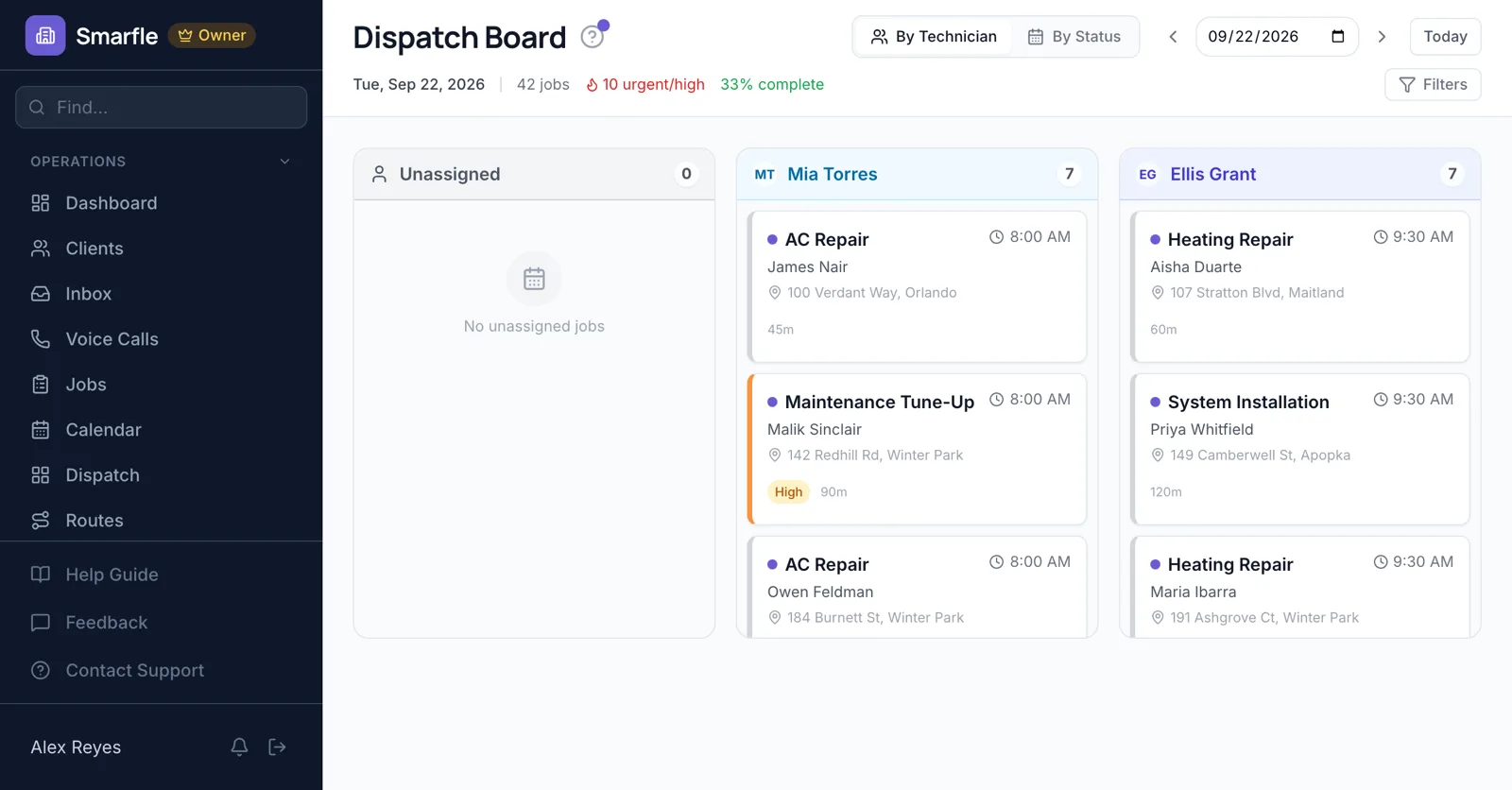
Dispatcher sees every tech's day in one view. New emergency call rolls in, drag it onto the right truck, system auto-recalculates the route and warns if the next job will run late. Tech gets the updated route on their phone within seconds.
Route optimization powered by Google Directions
Stops are reordered against real Google Directions drive times rather than grouped by ZIP, and the order can be overridden by hand when somebody has to be first. Whether that frees up enough of the day for another job depends entirely on how spread out the route was to begin with.
Arrival stamped on the job
A tech taps once when they reach the site and the work order records the moment. The visit timeline comes from what happened rather than from somebody's memory at the end of the week.
Offline-first sync that actually works
Tech in a basement, on a roof, in a yard with no LTE? Smarfle queues every action locally (work order updates, photos, signatures, time logs) and syncs the second connectivity returns. Most field-service CRMs break here. Smarfle's offline mode is the reason a lot of our customers switched in the first place.
Photo proof attached to every job
Before, during and after photos attach to the work order itself, so what the site looked like lives with the job instead of in somebody's camera roll. When a customer disputes the work or an insurer wants documentation, the trail is already where you need it.
Same-day invoicing from the truck
Job done. Tech taps Complete on the work order. Invoice auto-generates from the line items + parts logged. Customer gets SMS with payment link. Pays via card or ACH on the way back to their door. No clipboard, no paper invoice book, no end-of-week billing scramble.
Built for the 24 field-service industries we serve
Pest control (treatment logs per visit). HVAC (refrigerant tracking by EPA Section 608). Roofing (storm-damage insurance claims). Each industry gets default labels, services, voice AI prompts, and feature visibility that matches how the trade actually works. Generic CRMs ship one template for everyone.
Generic CRM vs Smarfle
Not in the field?
Sister hubs covering the rest of the Smarfle universe.
Field service CRM pricing
All plans include a 14-day free trial. No credit card required.
Solo
Sole operators getting started
Starter
Small teams adding tools and growth
Professional
Growing service businesses
Business
Multi-location operations
Field service CRM questions
How does Smarfle compare to ServiceTitan for field service?
ServiceTitan is excellent enterprise field-service software at $400+/seat/month + setup fees + annual contracts. Built for $5M+ revenue residential service businesses. Smarfle is built for small-to-medium field service operations (1-30 techs) at $19-349/month total. Same core workflow (dispatch, mobile work orders, route optimization, photo proof) without the enterprise pricing or implementation overhead.
Does the mobile app really work offline?
Yes, this is what we're known for. Smarfle's PWA caches the work order, customer info, services, and pricing locally. Tech can complete the entire job (notes, photos, signature, payment capture) offline. Everything syncs to the office the moment cell signal comes back. We test this every release because it's the #1 reason customers switch from competitors that 'support mobile' but break the moment you lose LTE.
Can I track techs in real time on a map?
No, there is no live GPS tracking. The dispatch board shows who has which jobs and what state each one is in, the routes page sequences the day and gives drive times, and the work order records the moment a tech marks arrival. If live vehicle tracking is a hard requirement, a dedicated telematics product does that properly and this is not one.
How does route optimization handle emergency calls?
Drop the emergency onto the board and the travel time is re-checked, with a warning if it pushes the next job past its window. Whether the rest of the day absorbs it depends on how tight the route already was, which is exactly what the warning is there to tell you.
Does this work for commercial field service or just residential?
Both. Fire protection inspections (commercial-only), HVAC service contracts (mixed), pest control (mixed), security alarm (commercial-leaning) all run on Smarfle. Multi-location commercial customers get their own portal showing service history across all sites.
What about parts inventory in the trucks?
Inventory tracks per-truck (capacitors on Truck 1, refrigerant on Truck 3). Dispatch warns when a job needs a part the assigned truck doesn't have. Restock alerts fire when stock dips below reorder level.
Can technicians schedule their own follow-ups?
Yes. Tech finishes a service call, sees the recommended next service (water heater flush in 6 months, return for replacement quote in 2 weeks), and schedules the follow-up before they leave the customer's driveway. Massive retention boost vs. forgetting to follow up.
How are SMS confirmations + reminders handled?
Automated SMS confirmations on booking, day-before reminders, 'tech is on the way' messages with ETA, and post-service review requests. All configurable per business. Billed at $0.03 per SMS pay-as-you-go.
Why businesses stay
Who you are buying from
Ihor Lavrenenko, founder of Smarfle and author of Rank, Ring, Repeat, a local SEO guide for business owners, puts his name on this product after helping hundreds of local businesses grow. Ask for a feature or a change and it is often built by the next day.
Start free
Try Smarfle free for 14 days. No credit card required, full access to every feature, real customer support if you need help getting started.