Accounting CRM software
Accounting CRM software for recurring work against immovable deadlines, regenerating monthly bookkeeping and logging time against the engagement while it is still fresh.
63
11
$24,800
9
Martinez Family Trust
Tax Preparation (1040)
Bright Leaf Consulting
Monthly Bookkeeping
Harper & Co LLC
Quarterly Payroll Filing
Westfield Properties
Annual Audit Preparation
Software an accounting firm runs on
The work repeats every month and the deadlines do not move. Smarfle regenerates recurring bookkeeping, logs time against the engagement while it is fresh, and produces the invoice without a month-end scramble, for one accountant or a full firm.
Accounting scheduling software
Your season meetings have to be spread before the season arrives, and December is the only month you can do it in. Smarfle places each client's annual appointment in advance and lets them pick their own slot, so January is work rather than three hundred phone calls.
Learn moreAccounting billing software
Your monthly retainers compete with client work every single month they are raised by hand. Smarfle puts each engagement on its own cadence with terms held on the client, so the cycle runs without anyone opening it.
Learn moreAccounting invoicing software
You work faster than you record during season, and then set the fee from memory in April. Smarfle tracks hours against the client file as you go and keeps filing costs on their own lines, so your fee carries the work rather than someone else's charges.
Learn moreThe growth side, built in
Accounting firm call tracking
January through April, the phone does not stop. Tracked calls keep every prospect conversation on record for the quiet-season follow-up.
Reviews and Google Business Profile
Businesses pick accountants on trust signals. Reviews requested after clean filings build the rating that wins next year's switchers.
Website and lead follow-ups
Consultation bookings from your site feed the calendar, and off-season follow-ups turn tax-only clients into year-round engagements.
CRM plans that grow with your accounting firm
All plans include a 14-day free trial. No credit card required.
Solo
Sole operators getting started
- 1 user
- Up to 500 clients
- 1 GB storage
- Public booking link + calendar
- Client management
- Work orders with photos
- Invoices + Stripe payments
- Voice AI receptionist (usage-based)
- AI drafts + work order summaries
- GMB rank tracking + Search Console
- GBP Posts + Dashboard
- API access + webhooks
- Mobile PWA + CSV import/export
Starter
Small teams adding tools and growth
- Up to 5 users (1 owner + 4 techs)
- Up to 2,000 clients
- 3 GB storage
- 2 branch locations
- Everything in Solo
- Website builder + AI content
- Your own domain on that website
- Branded client portal
Professional
Growing service businesses
- Up to 10 users
- Up to 5,000 clients
- 5 branch locations
- 10 GB storage
- Everything in Starter
- Manager role (up to 2)
- 50 saved email templates
Business
Multi-location operations
- Up to 30 users
- Up to 10,000 clients
- 10 branch locations
- 20 GB storage
- Everything in Professional
- Manager role (up to 5)
- Priority support
SMS, email, AI, and voice are billed pay-as-you-go. See full pricing breakdown →
What an inefficient accounting firm looks like
Accounting firms are excellent at other people's deadlines and put their own last. Recreating a week of time on a Friday is guesswork dressed up as a record.
Tax deadlines pile up without warning
Every client has different filing dates, extension deadlines, and quarterly estimates. When these live in spreadsheets or someone's head, a missed deadline means penalties for the client and liability for your firm.
Monthly bookkeeping clients get inconsistent service
Recurring engagements should run like clockwork, but without a system tracking who needs what and when, some clients get attention while others wait. Inconsistency leads to churn your firm cannot afford.
Time tracking happens after the fact
Staff reconstruct their hours at the end of the week from memory. Quick client calls, email exchanges, and review sessions never get logged. The result is invoices that undercount the real work done.
Every accounting call, handled your way
Season changes how much phone you can take, so the number changes with it. Each mode logs the call to the client record and the summary is there when you return it.
Plain forwarding
$0.04/min
Just rings your phone. Every call logged as answered or missed.
Forward with call tracking
$0.10/min
Rings your phone. Recorded, transcribed, summarized, and logged to the customer record.
Busy message + text-back
~$0.05/call
Plays your message, hangs up, and texts the caller. Replies land in your Inbox as leads.
AI receptionist
$0.25/min
The AI answers, qualifies the caller, and books the job. Great after hours if you want it.
Spam screening is included in every mode
Turn it on and unknown callers hear one sentence and press a key before the call connects. Dialer software does not press keys, so it never reaches you. How screening works
- Your customers skip it. Known clients and callers on mobile numbers are never screened.
- You are not billed for it. Screened, silent, and blocked calls cost nothing.
- One blocklist. Block a number once and it stops calling and texting.
Curious how the AI option sounds? Call (866) 355-9645 and try booking a consultation with it.
How an accounting client flows through Smarfle
An engagement starts once and then regenerates. Here is the path from the first enquiry to a monthly invoice that sends itself.
- 1
Engagement enquiry arrives
An enquiry opens a client record carrying the entity type, the fiscal year, and any notes about the prior accountant.
- 2
Onboarding consultation
Calendar slot for the discovery call. Custom fields capture revenue range, software (QuickBooks, Xero), and complexity.
- 3
Engagement signed
Engagement letter via e-sign, retainer captured via Stripe, matter becomes a work order with monthly bookkeeping cadence as a recurring work order.
- 4
Monthly close + ad-hoc work logged
Time tracking per client against billable hours, monthly close as a recurring work order with checklist (bank rec, A/R, A/P, P&L). Ad-hoc projects as separate work orders.
- 5
Recurring monthly bill + review
Stripe Connect handles monthly retainer billing. Year-end billing via separate invoice with Stripe payment link. Review request after first quarter.
Same flow for every accounting business, only the terminology and details change.
Smarfle fits some accounting firms better than others
Recurring engagements decide it, so if the same clients come back every month or every year this fits at any firm size.
We built this for you if...
Tap the ones that resonate
This probably isn't for you if...
And that's okay
Everything Smarfle does for an accounting firm
The accounting is your work. Running the engagements, billing them, and finding the next client are the business around it.
Engagement dashboard
See every active engagement with client name, type, deadline, assigned staff, and status. Filter by urgency, staff member, or service type to focus your attention.
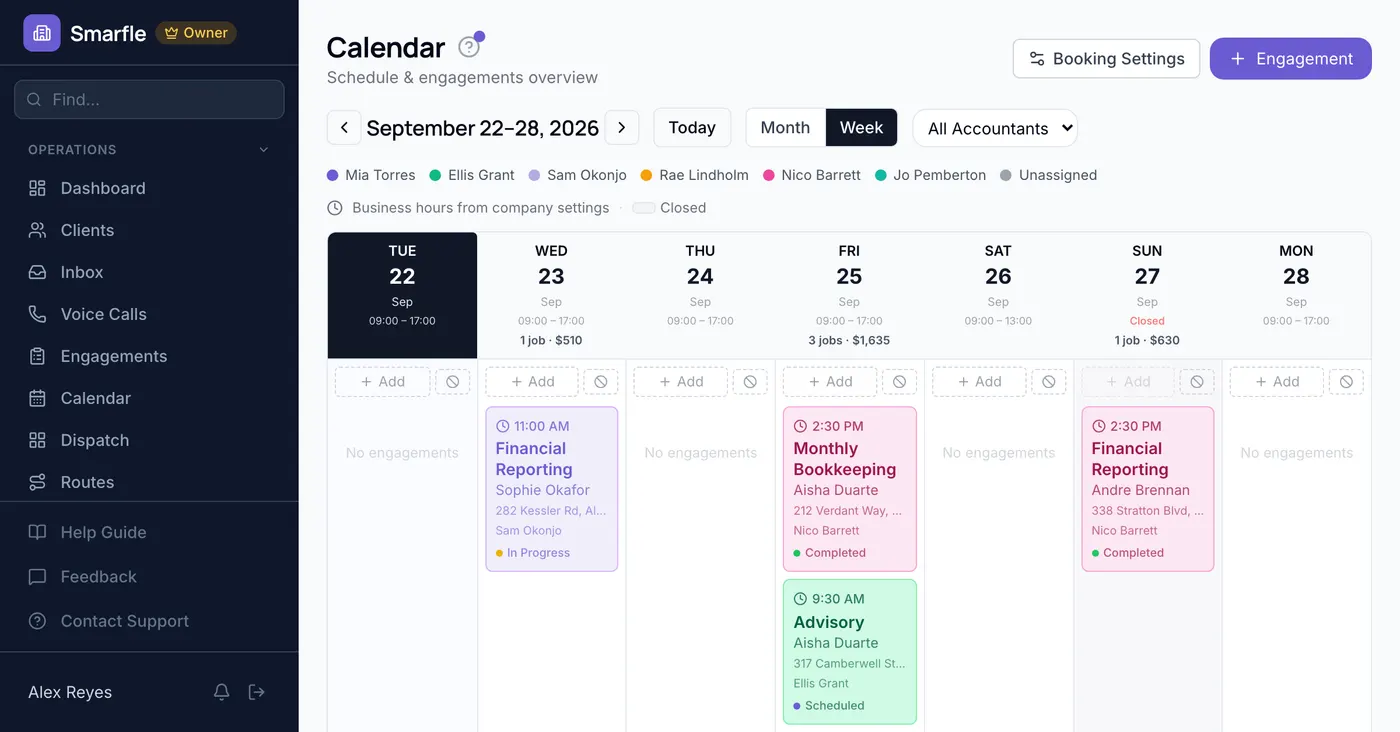
Deadline Calendar
All filing deadlines, extension dates, and recurring due dates on one calendar. Color-coded by type and filterable by staff so no one misses a date.
Recurring engagement templates
Set up monthly bookkeeping and quarterly review templates that auto-generate engagements. Your recurring clients stay on schedule without manual setup each cycle.
Document collection tracking
Track which documents have been received per engagement. See at a glance which clients still owe paperwork and send reminders through the portal.
Accounting CRM features that outlast tax season
One partner at your firm knows which client files an extension every year, which one arrives with a shoebox, and which one needs the letter worded carefully. Not one line of it is written down where a second preparer could find it. It belongs on the client record as fields you defined, in email wording anyone can reuse, and in a signal your other systems can act on.
Most of what your firm knows about a client is stored in habits, and this is where it stops being stored that way.
Client details in your firm's own words
Entity type, fiscal year end and the software a client keeps their books in vary by firm, and yours asks its own set. Define that set once so it appears on every client file holding what you enter, and a second preparer opens the file already knowing it.
Missing document requests ready to go
Engagement confirmations and chasers for paperwork are written a single time, with placeholders for whose account it is, which engagement it covers and what is outstanding. Sending happens from the record with everything already populated, and you read it through beforehand.
Ledger software updated as it happens
A new client or a paid invoice is something your ledger package wants to know about, and any of the seven triggers can post straight to it. Every request is signed so the receiving end confirms the source, and a missed attempt goes out again on a delay.
Clients who bring their business circle
Owners ask other owners who does their books, so one well-served client can introduce you across an entire peer group over a few years. Put a code in their hands, let the discount apply unprompted, and keep a running tally of what each client has sent.
Get more clients for your accounting firm
Accounting lead generation
Monthly bookkeeping clients bill every month for years, which makes one of them worth an enormous number of leads. Smarfle finds the businesses in your area looking for an accountant and sends the company size and the service they need.
Flat pricing per accepted lead
Accounting leads run about $30 each. You see the job and the ZIP first, then accept or pass free. No monthly lead budget, no bidding wars.
When leads start
We expand the directory around every business that joins, and Google needs time to rank new pages, so plan for up to two months before leads ramp up. You pay per lead, never for waiting. A Google Business Profile with real reviews brings them sooner.
Requests arrive pre-qualified
Every quote request already answers what do you need and for whom, so your callback quotes instead of interviews.
Fair by design
Your existing customers and repeat requests are always free, and a bad lead can be disputed with a refund to your wallet.
What accounting firms ask before switching
Related industries
Other trades using Smarfle to run their book of business.
Tax preparation CRM
Same client base and seasonal cadence. Many firms run bookkeeping and tax together.
ExploreFinancial advisor CRM
Adjacent financial services for the same clients. Shared documents and recurring engagements.
ExploreLaw firm CRM
Professional-services firm billing by matter and retainer with a client portal.
ExploreSwitching to Smarfle from another accounting CRM?
Half finished engagements in the thick of a filing season are exactly why this keeps getting postponed. We take the move off your desk, lifting clients and billable services out of your export into an import we build, then opening an account for each accountant one name at a time. Everyone on it works US hours.
Why businesses stay
Who you are buying from
We answer requests the same day. If your business needs a new feature, or an existing one changed, it gets built fast, often by the next day. Ihor Lavrenenko puts his name on this product: he has helped hundreds of local businesses grow, and Smarfle is how that experience shows up in your operation every morning.
Ready to run your accounting business from one place?
Join service businesses that book more jobs, get paid faster, and grow their reputation with Smarfle.
14 days free · No credit card · Cancel anytime