Tax preparation CRM software
Tax preparation CRM software sized for the ten weeks that carry your year. Missing documents are chased automatically. Every return sits on one status board and clients stay informed without a call from your staff.
142
38
87
$31,200
Nguyen Family (1040)
Individual Tax Return
Atlas Digital LLC
Business Tax Return (1120S)
Campbell Estate
Estate Tax Return (706)
Greenwood Partners
Partnership Return (1065)
Software a tax preparation business runs on
Ten weeks carry the whole year and every hour in them is spoken for. Smarfle chases missing documents on its own, keeps every return's status on one board, and keeps clients updated without your staff placing a single call. One preparer or twenty seats.
Tax preparation scheduling software
Four hundred returns and every client wants an appointment in the same eight weeks. Smarfle lets them book themselves against a diary you cap deliberately, so there is still time left in the week to actually prepare the returns you took in.
Learn moreTax preparation billing software
Your fees land in April and your advisory retainers are billed whenever there is a gap. Smarfle holds each arrangement on its own cadence, so revenue is not concentrated in the six weeks you are least able to chase anything.
Learn moreTax preparation invoicing software
You deliver returns in April and chase the fees in May, which is the worst possible month to be asking. Smarfle raises the invoice at delivery from the client file with a payment link on it, so the fee is collected while the return is still fresh.
Learn moreThe growth side, built in
Tax season call tracking
February calls arrive faster than anyone can answer. Tracking logs the flood, and text-backs book appointments from the missed ones.
Reviews and Google Business Profile
Filers pick preparers on rating and proximity. Reviews requested after refunds land write themselves.
Website and lead follow-ups
Intake forms with document checklists cut appointment time, and off-season follow-ups sell planning to your best returns.
CRM plans that grow with your tax business
All plans include a 14-day free trial. No credit card required.
Solo
Sole operators getting started
- 1 user
- Up to 500 clients
- 1 GB storage
- Public booking link + calendar
- Client management
- Work orders with photos
- Invoices + Stripe payments
- Voice AI receptionist (usage-based)
- AI drafts + work order summaries
- GMB rank tracking + Search Console
- GBP Posts + Dashboard
- API access + webhooks
- Mobile PWA + CSV import/export
Starter
Small teams adding tools and growth
- Up to 5 users (1 owner + 4 techs)
- Up to 2,000 clients
- 3 GB storage
- 2 branch locations
- Everything in Solo
- Website builder + AI content
- Your own domain on that website
- Branded client portal
Professional
Growing service businesses
- Up to 10 users
- Up to 5,000 clients
- 5 branch locations
- 10 GB storage
- Everything in Starter
- Manager role (up to 2)
- 50 saved email templates
Business
Multi-location operations
- Up to 30 users
- Up to 10,000 clients
- 10 branch locations
- 20 GB storage
- Everything in Professional
- Manager role (up to 5)
- Priority support
SMS, email, AI, and voice are billed pay-as-you-go. See full pricing breakdown →
What an inefficient tax business looks like
Season does not create the chaos. It reveals it. Ten weeks of volume will find every manual step you were getting away with for the rest of the year.
Document collection is a constant chase
Clients promise to send their W-2s and 1099s but never follow through. Your staff spends hours sending reminder emails and making phone calls. Returns sit incomplete while deadlines approach.
Seasonal volume overwhelms your workflow
January through April, every preparer is buried. Without a clear system showing who is working on what, returns get started but not finished, clients slip through the cracks, and extensions pile up unnecessarily.
Status updates require manual tracking
Clients want to know where their return stands. Your front desk fields dozens of status calls daily, pulling staff away from preparation work. A simple question consumes ten minutes every time.
Every tax preparation call, handled your way
The phone cannot be the bottleneck in season. Calls can text back, book, or simply log themselves. You switch between those as demand changes.
Plain forwarding
$0.04/min
Just rings your phone. Every call logged as answered or missed.
Forward with call tracking
$0.10/min
Rings your phone. Recorded, transcribed, summarized, and logged to the customer record.
Busy message + text-back
~$0.05/call
Plays your message, hangs up, and texts the caller. Replies land in your Inbox as leads.
AI receptionist
$0.25/min
The AI answers, qualifies the caller, and books the job. Great after hours if you want it.
Spam screening is included in every mode
Turn it on and unknown callers hear one sentence and press a key before the call connects. Dialer software does not press keys, so it never reaches you. How screening works
- Your customers skip it. Known clients and callers on mobile numbers are never screened.
- You are not billed for it. Screened, silent, and blocked calls cost nothing.
- One blocklist. Block a number once and it stops calling and texting.
Curious how the AI option sounds? Call (866) 355-9645 and try booking a consultation with it.
How a tax return flows through Smarfle
A return moves from document chase to filing to payment, with the client kept informed at every stage without a call.
- 1
Returning client books / new client inquires
Returning clients are prompted by an automatic reminder while new enquiries arrive through the form or the phone. The record holds last year's custom fields.
- 2
Document intake
Booking confirmation includes a checklist of required documents. Client uploads via the client portal; documents auto-attach to the client record.
- 3
Preparer assigned + return drafted
Work order assigned to the right preparer based on complexity (custom fields). Time tracking against billable hours. Job checklist enforces every-form-checked discipline.
- 4
Review + e-file
Senior review captured in checklist, e-signature via portal, return e-filed, refund or balance due communicated.
- 5
Bill + review + next-year reminder
Auto-invoice via Stripe payment link, review request after acceptance from IRS, maintenance reminder schedules next year's intake.
Same flow for every tax preparation business, only the terminology and details change.
Who Smarfle is built for in tax preparation
Volume inside a short season is what this handles. A handful of returns a year will not need it.
We built this for you if...
Tap the ones that resonate
This probably isn't for you if...
And that's okay
Everything Smarfle does for a tax business
Preparing returns is the job. Managing the queue, collecting the fee, and keeping clients coming back next January are the rest.
Return tracking pipeline
Every return moves through intake, preparation, review, filing, and completion. See all returns at each stage and identify bottlenecks before deadlines arrive.
Document collection portal
Clients upload documents directly to their return. A checklist shows what has been received and what is still missing so your team knows exactly where things stand.
Preparer assignment dashboard
See every preparer's current workload, assigned returns, and upcoming deadlines. Reassign returns in one click to balance capacity during rush periods.
Deadline alerts and extension tracking
Get notified before filing deadlines. Track which returns need extensions and manage extension filings as a separate workflow so nothing is forgotten.
Your tax CRM should price the return
Deal value and a close date are what a pipeline tool keeps. Neither tells you whether the return you just filed earned the seat it occupied in February. What belongs on the record is the fee the client agreed to, the minutes that went into the work, and the cost of producing it. Those are different records, and they are the ones that decide the season.
Ten weeks decide the year, and you cannot price them well without knowing what last season's work actually took.
No surprises about the fee
Return preparation, schedules and any advisory time are quoted line by line, with a retainer attached when you want one. The client signs on screen, that retainer offsets the final bill, and the stored copy carries a signature from each side.
Time per return instead of last year's fee
A return collects minutes from whoever touched it, marked chargeable or written off, priced by the rate sitting on that preparer. Mark it finished and the entry writes itself, then chargeable time fills the invoice lines when you raise the bill.
Find the returns you priced wrong
Outside preparation, review time you buy in and filing charges are recorded against the return, each carrying its own rate. Put the client fee next to that and returns priced for the wrong amount of work stop hiding inside an average.
Appointment invites during filing season
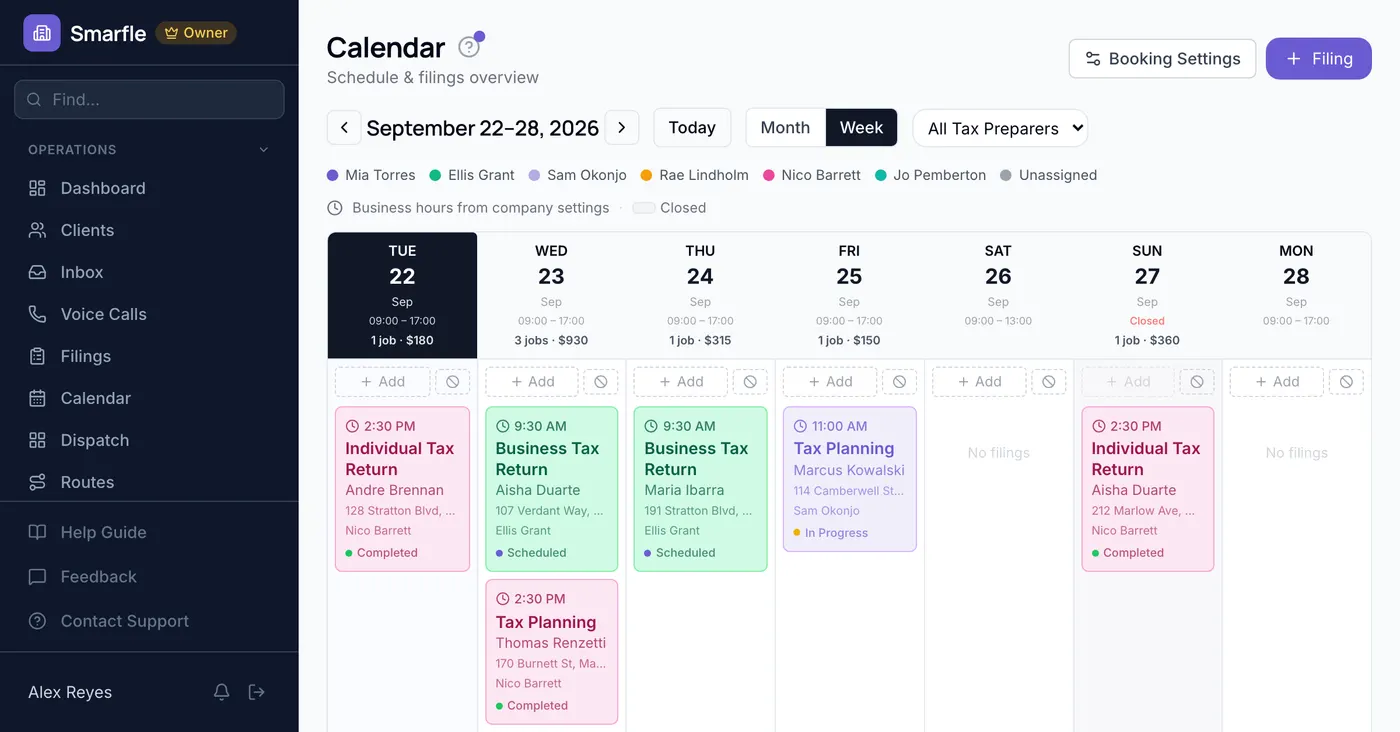
Each appointment you set emails the client an invite file, holding the slot on their side as firmly as it holds on yours. Preparer by preparer coloring, month or week, shows remaining capacity while bookings are still coming in.
Get more clients for your tax business
Tax preparation lead generation
Most tax clients come back every year without being asked. The first one pays for itself many times over. Smarfle finds the people searching in your area during the season and sends their situation with the request. Take the returns you want.
Flat pricing per accepted lead
Tax Preparation leads run about $20 each. You see the job and the ZIP first, then accept or pass free. No monthly lead budget, no bidding wars.
When leads start
We expand the directory around every business that joins, and Google needs time to rank new pages, so plan for up to two months before leads ramp up. You pay per lead, never for waiting. A Google Business Profile with real reviews brings them sooner.
Fair by design
Your existing customers and repeat requests are always free, and a bad lead can be disputed with a refund to your wallet.
What tax firms ask before filing season
Related industries
Other trades using Smarfle to run their book of business.
Accounting CRM
Same client base year-round. Bookkeeping and tax prep run on one client relationship.
ExploreFinancial advisor CRM
Adjacent financial services for the same clients. Cross-refer planning and prep.
ExploreInsurance CRM
Seasonal financial-services work with renewals and document collection.
ExploreSwitching to Smarfle from another tax prep CRM?
Returns already in progress are the whole worry, so we work around your season rather than asking you to work around us. Clients and the services you price are loaded from a CSV we prepare, and each preparer receives an invitation individually. US staff do that work and stay reachable right through the season.
Why businesses stay
Who you are buying from
We answer requests the same day. If your business needs a new feature, or an existing one changed, it gets built fast, often by the next day. Ihor Lavrenenko puts his name on this product: he has helped hundreds of local businesses grow, and Smarfle is how that experience shows up in your operation every morning.
Ready to run your tax preparation business from one place?
Join service businesses that book more jobs, get paid faster, and grow their reputation with Smarfle.
14 days free · No credit card · Cancel anytime