Financial advisor CRM software
Financial advisor CRM software built to stop the annual review slipping. Reviews schedule themselves and client documents live on one record. Prospects get a follow-up sequence after the first meeting.
128
14
$52,600
11
Whitfield Retirement Plan
Quarterly Portfolio Review
Okafor Education Fund
529 Plan Setup
Brennan Estate Plan
Estate Planning Consultation
Park Family Trust
Trust Review and Update
Software a financial advisor runs on
The relationship is the product, and it quietly decays between reviews. Annual meetings schedule themselves, client documents live on one record, and prospects get a follow-up sequence after the first conversation instead of being remembered later. Smarfle does that for one advisor or a whole practice.
Financial advisor scheduling software
The annual review you promised at onboarding is the one that quietly stops happening around year three. Smarfle holds it on the household and brings it forward on its own, so a commitment made once keeps being kept.
Learn moreFinancial advisor billing software
Your quarter end is forty fee runs that all have to happen in the same week. Smarfle holds each client's fee basis so the whole quarter bills as one process, and keeps flat retainers moving on their own monthly cycle.
Learn moreFinancial advisor invoicing software
Your advisory fee is arithmetic nobody argues with until forty households need it in the same week. Smarfle builds each document from the household record with the working shown and the disclosures already attached, so nothing has to be assembled twice.
Learn moreThe growth side, built in
Advisor call tracking
Referred prospects call once to size you up. The conversation is recorded and logged, and a missed call gets a same-hour text-back.
Reviews and Google Business Profile
Referrals verify advisors online before transferring a nickel. Reviews and a complete profile confirm what the referrer promised.
Website and lead follow-ups
Meeting bookings from your site skip the phone tag, and annual-review follow-ups keep every household on schedule.
CRM plans that grow with your advisory practice
All plans include a 14-day free trial. No credit card required.
Solo
Sole operators getting started
- 1 user
- Up to 500 clients
- 1 GB storage
- Public booking link + calendar
- Client management
- Work orders with photos
- Invoices + Stripe payments
- Voice AI receptionist (usage-based)
- AI drafts + work order summaries
- GMB rank tracking + Search Console
- GBP Posts + Dashboard
- API access + webhooks
- Mobile PWA + CSV import/export
Starter
Small teams adding tools and growth
- Up to 5 users (1 owner + 4 techs)
- Up to 2,000 clients
- 3 GB storage
- 2 branch locations
- Everything in Solo
- Website builder + AI content
- Your own domain on that website
- Branded client portal
Professional
Growing service businesses
- Up to 10 users
- Up to 5,000 clients
- 5 branch locations
- 10 GB storage
- Everything in Starter
- Manager role (up to 2)
- 50 saved email templates
Business
Multi-location operations
- Up to 30 users
- Up to 10,000 clients
- 10 branch locations
- 20 GB storage
- Everything in Professional
- Manager role (up to 5)
- Priority support
SMS, email, AI, and voice are billed pay-as-you-go. See full pricing breakdown →
What an inefficient advisory practice looks like
Nothing here is urgent, which is exactly the problem. A review postponed twice is a relationship cooling, and it never feels like an emergency until the assets move.
Annual reviews get postponed indefinitely
Clients need regular portfolio reviews, but scheduling falls to whoever remembers. Reviews get pushed back quarter after quarter until the client feels neglected and starts taking calls from other advisors.
Compliance documentation is scattered
Regulators expect detailed records of every recommendation, client meeting, and suitability assessment. When notes live in email threads and notebooks, an audit becomes a weeks-long scramble.
Prospect follow-up dies after the first meeting
You meet a prospect, discuss their goals, and promise to send a proposal. Then client work takes over, the follow-up never happens, and a qualified lead goes cold. This pattern repeats every month.
Every financial advisor call, handled your way
Every call is recorded against the client it came from, so nothing needs re-explaining on the callback and unknown numbers never reach you.
Plain forwarding
$0.04/min
Just rings your phone. Every call logged as answered or missed.
Forward with call tracking
$0.10/min
Rings your phone. Recorded, transcribed, summarized, and logged to the customer record.
Busy message + text-back
~$0.05/call
Plays your message, hangs up, and texts the caller. Replies land in your Inbox as leads.
AI receptionist
$0.25/min
The AI answers, qualifies the caller, and books the job. Great after hours if you want it.
Spam screening is included in every mode
Turn it on and unknown callers hear one sentence and press a key before the call connects. Dialer software does not press keys, so it never reaches you. How screening works
- Your customers skip it. Known clients and callers on mobile numbers are never screened.
- You are not billed for it. Screened, silent, and blocked calls cost nothing.
- One blocklist. Block a number once and it stops calling and texting.
Curious how the AI option sounds? Call (866) 355-9645 and try booking a consultation with it.
How a financial advisory engagement flows through Smarfle
A prospect becomes a client and then a relationship on a review schedule. These are the steps.
- 1
Lead arrives via referral or website
A referral or a web enquiry opens a client record, with custom fields for investable assets, life stage, and the goals discussed.
- 2
Discovery meeting booked
Calendar slot. Workflow automation sends a pre-meeting questionnaire. Documents collected via client portal.
- 3
Plan delivered + signed
Plan attached to client record, presented in second meeting, agreement signed via e-sign, fee billed via Stripe.
- 4
Quarterly reviews + ongoing work
Recurring work orders auto-generate quarterly review meetings. Time tracking for billable hours; expenses for custodial/research costs.
- 5
Recurring AUM bill + annual review reminder
Stripe Connect handles quarterly fee billing. Maintenance reminders schedule the annual review.
Same flow for every financial advisor business, only the terminology and details change.
The advisory practices Smarfle suits
It depends on where your client records live. If they are yours to manage, this fits at any book size.
We built this for you if...
Tap the ones that resonate
This probably isn't for you if...
And that's okay
Everything Smarfle does for an advisory practice
Advising is what clients pay for. Managing the book, billing it, and adding to it are what keep the practice running.
Client profile dashboard
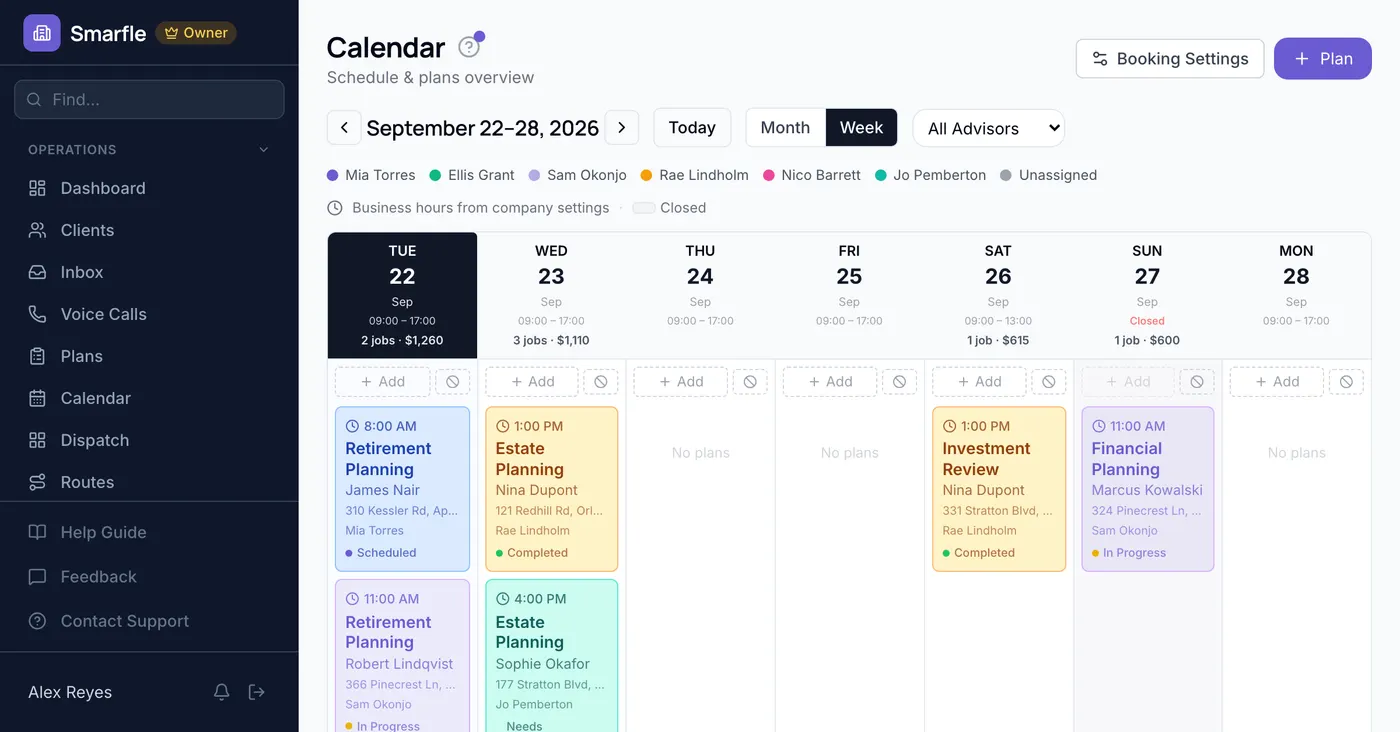
See every client with their plan type, risk profile, last review date, and next scheduled meeting. Filter by advisor, review status, or client segment.
Review scheduling and alerts
Set review frequencies per client. Smarfle alerts you when a review is overdue so no client goes too long without a check-in. Schedule directly from the alert.
Prospect pipeline
Track prospects from initial contact through discovery, proposal, and onboarding. See conversion rates and identify where prospects stall in your process.
Meeting preparation view
Before every meeting, see the client's plan details, recent activity, outstanding items, and last meeting notes in one screen. Walk in prepared every time.
Notes and documents on the client record
Notes you write and status changes the system writes both land on the client stamped with a name and a time. Plan documents sit in folders on that same record, private until you switch one across to the client login.
Where financial advisor CRM revenue leaks
Ask how many hours went into the plan you charged a flat fee for, and the honest answer is that nobody wrote them down. Hours logged against the engagement, with an hourly rate stored on each person, give you a figure to check before you quote the next one.
Charging a flat fee is fine, as long as you know what the work cost you to deliver.
Advisory minutes carry a rate per person
Plan work, portfolio reviews and client meetings all record minutes with a marker for whether they are recoverable, and everyone on the team has a rate stored. Complete the engagement and the record is created without you doing it, then billing pulls recoverable minutes into the lines.
Advisory fees on a set rhythm
Stripe keeps the payment method and your fee is taken at the interval named in the agreement, with no fresh request each period. Money and documentation are created in one motion, so nothing has to be reconciled afterward.
Segment the book without a spreadsheet
Retirement income households, business owners and anyone an accountant sent your way deserve different outreach from you. Each becomes a colored marker you define, goes onto the client record, and any single one of them can be isolated on screen.
Portfolio and planning tools, told automatically
Your planning software and your compliance archive both need the same client events, and seven of those can be delivered as outgoing calls. A signature travels with each one so the receiver knows it is genuine, and delivery is attempted repeatedly when an endpoint stops answering.
Get more clients for your advisory practice
Financial advisor lead generation
One household that stays is worth decades of fees. Smarfle finds the people in your area actively looking for an advisor and sends what they are trying to solve, so the first conversation starts somewhere real. You accept the ones that fit your book.
Flat pricing per accepted lead
Financial Advisor leads run about $55 each. You see the job and the ZIP first, then accept or pass free. No monthly lead budget, no bidding wars.
When leads start
We expand the directory around every business that joins, and Google needs time to rank new pages, so plan for up to two months before leads ramp up. You pay per lead, never for waiting. A Google Business Profile with real reviews brings them sooner.
Requests arrive pre-qualified
Every quote request already answers what brings you in and where are you now, so your callback quotes instead of interviews.
Fair by design
Your existing customers and repeat requests are always free, and a bad lead can be disputed with a refund to your wallet.
Before an advisor moves their book
Related industries
Other trades using Smarfle to run their book of business.
Accounting CRM
Adjacent financial services for the same clients. Shared documents and recurring engagements.
ExploreInsurance CRM
Financial-services cross-sell with renewals, reviews, and client follow-up.
ExploreTax preparation CRM
Same clients at tax time. Cross-refer planning and preparation.
ExploreSwitching to Smarfle from another advisor CRM?
A book of business is not something you hand to an import tool and hope, which is why you do not hand it to one here. We build the CSV of clients and services ourselves, load it, and invite each advisor in turn, all of it done by a US based person.
Why businesses stay
Who you are buying from
We answer requests the same day. If your business needs a new feature, or an existing one changed, it gets built fast, often by the next day. Ihor Lavrenenko puts his name on this product: he has helped hundreds of local businesses grow, and Smarfle is how that experience shows up in your operation every morning.
Ready to run your financial advisor business from one place?
Join service businesses that book more jobs, get paid faster, and grow their reputation with Smarfle.
14 days free · No credit card · Cancel anytime