MSP CRM software
MSP CRM software where the contract, not the ticket, is what everything hangs off. Renewals happen without anyone remembering. Technician load is visible before someone is buried and logged hours become the invoice.
18
3
$12,400
7
Apex Law Group
Server Migration
Coastal Dental
Workstation Setup (5 units)
Brightside Realty
Network Troubleshooting
Summit Accounting
Monthly Maintenance
Software an MSP runs on
Contracts pay the bills while tickets eat the day, and the contracts are the half that gets forgotten. Smarfle renews them without anyone remembering, shows which engineer is buried before they say so, and turns logged hours into the monthly invoice. It scales from one engineer to thirty without changing.
Managed IT / MSP scheduling software
Your quarterly reviews and patching windows lose every week to whatever ticket arrived this morning. Smarfle puts them on the calendar as real commitments generated from each contract, so planned work has somewhere to stand instead of being absorbed.
Learn moreManaged IT / MSP billing software
Seat counts drift, projects finish, and your monthly bill gets assembled from three places. Smarfle holds the contracted seats and terms on the client, so the recurring charge reflects what is actually deployed this month.
Learn moreManaged IT / MSP invoicing software
Your ticket work and your project work move at different speeds, and only one of them has a natural moment to bill. Smarfle keeps ticket time on the ticket and invoices the project at its milestone, so a client can see which is which without asking.
Learn moreThe growth side, built in
MSP call tracking
Prospect calls land while you are deep in an incident. Tracked and logged, they get a text-back before the prospect tries the next provider.
Reviews and Google Business Profile
IT buyers check reviews to gauge response times. Testimonials from long-retained clients close contracts your proposals start.
Website and lead follow-ups
Assessment request forms qualify environment size upfront, and follow-ups nurture the switches that take a contract cycle to land.
CRM plans that grow with your MSP
All plans include a 14-day free trial. No credit card required.
Solo
Sole operators getting started
- 1 user
- Up to 500 clients
- 1 GB storage
- Public booking link + calendar
- Client management
- Work orders with photos
- Invoices + Stripe payments
- Voice AI receptionist (usage-based)
- AI drafts + work order summaries
- GMB rank tracking + Search Console
- GBP Posts + Dashboard
- API access + webhooks
- Mobile PWA + CSV import/export
Starter
Small teams adding tools and growth
- Up to 5 users (1 owner + 4 techs)
- Up to 2,000 clients
- 3 GB storage
- 2 branch locations
- Everything in Solo
- Website builder + AI content
- Your own domain on that website
- Branded client portal
Professional
Growing service businesses
- Up to 10 users
- Up to 5,000 clients
- 5 branch locations
- 10 GB storage
- Everything in Starter
- Manager role (up to 2)
- 50 saved email templates
Business
Multi-location operations
- Up to 30 users
- Up to 10,000 clients
- 10 branch locations
- 20 GB storage
- Everything in Professional
- Manager role (up to 5)
- Priority support
SMS, email, AI, and voice are billed pay-as-you-go. See full pricing breakdown →
What an inefficient MSP looks like
Ticket work is loud and contract work is silent, so the silent half is the half that slips. You notice a renewal you missed roughly a month after the client did.
Support tickets pile up without visibility
Clients email, call, and text with issues that end up in different inboxes. Without a single queue, tickets get lost, response times blow past SLA thresholds, and clients start shopping for a new provider.
Contract renewals slip past unnoticed
Managed service agreements renew annually or quarterly, but tracking dozens of renewal dates manually means some expire without a conversation. Clients quietly cancel or renegotiate with a competitor.
Technician workloads are impossible to balance
One tech is buried under fifteen open tickets while another has three. Without workload visibility, you cannot redistribute effectively, and the overloaded tech starts making mistakes from rushing.
Every managed IT / MSP call, handled your way
Support calls and sales calls come down the same line. Call tracking logs both to the right client record, and after-hours routing is set separately from the working day.
Plain forwarding
$0.04/min
Just rings your phone. Every call logged as answered or missed.
Forward with call tracking
$0.10/min
Rings your phone. Recorded, transcribed, summarized, and logged to the customer record.
Busy message + text-back
~$0.05/call
Plays your message, hangs up, and texts the caller. Replies land in your Inbox as leads.
AI receptionist
$0.25/min
The AI answers, qualifies the caller, and books the job. Great after hours if you want it.
Spam screening is included in every mode
Turn it on and unknown callers hear one sentence and press a key before the call connects. Dialer software does not press keys, so it never reaches you. How screening works
- Your customers skip it. Known clients and callers on mobile numbers are never screened.
- You are not billed for it. Screened, silent, and blocked calls cost nothing.
- One blocklist. Block a number once and it stops calling and texting.
Curious how the AI option sounds? Call (866) 355-9645 and try booking a consultation with it.
How an MSP ticket flows through Smarfle
A ticket arrives, gets worked, and turns into billable hours on a contract that renews itself.
- 1
Ticket lands
Tickets come from the client portal, the web form, or a call captured out of hours. Each becomes a work order with the affected user, system, and severity.
- 2
Tier-1 dispatched on-call
Calendar shows on-call rotation. Work order routes to the right tech based on contract level (custom fields).
- 3
Remote or on-site work logged
Tech logs steps taken, time tracking against billable hours or contract minutes, parts pulled from inventory if a hardware swap is needed.
- 4
Resolution documented
Job checklist enforces resolution, root cause, and customer-confirmed-working steps. Photos for hardware fixes, screenshots for software.
- 5
Monthly retainer + project bills + review
Recurring monthly retainer billing via Stripe Connect. Project work invoiced separately from billable hours. Review request after major project completion.
Same flow for every managed IT / MSP business, only the terminology and details change.
Where Smarfle fits an MSP
Recurring contracts are the dividing line. Hourly-only shops with no renewals will use very little of this.
We built this for you if...
Tap the ones that resonate
This probably isn't for you if...
And that's okay
Everything Smarfle does for an MSP
Tickets are only a third of it. Keeping contracts renewed and winning the next client are the other two.
Ticket queue with priority sorting
All client requests land in one queue sorted by priority and SLA deadline. Assign tickets to technicians with a single click and track status in real time.
Time tracking per ticket
Technicians log time spent on each ticket directly in the work order. Billable hours roll up into invoices automatically at the end of the billing cycle.
Site documentation library
Store network diagrams, login credentials, hardware inventories, and configuration notes on each client record. Techs access it all from their phone before arriving on site.
Technician workload balancing
View each tech's open ticket count, average resolution time, and current assignments. Drag tickets between techs to balance the load in seconds.
MSP CRM features under the ticket queue
Your newest engineer can read the ticket and still has to ask someone what happened with that client the last three times. That history lives in a colleague's memory and in a thread nobody can search. Written onto the client record instead, the first week stops costing two people their day.
What an engineer knows about a client should outlive the engineer, and that is what the record is for.
Nobody rebuilds a week from a mailbox
Status moves get logged without anyone remembering to do it, alongside whatever you type in yourself, on both the client and the job. Every line shows who was behind it and when, which is the whole difference between a history and a guess.
On-site visits land in the client calendar
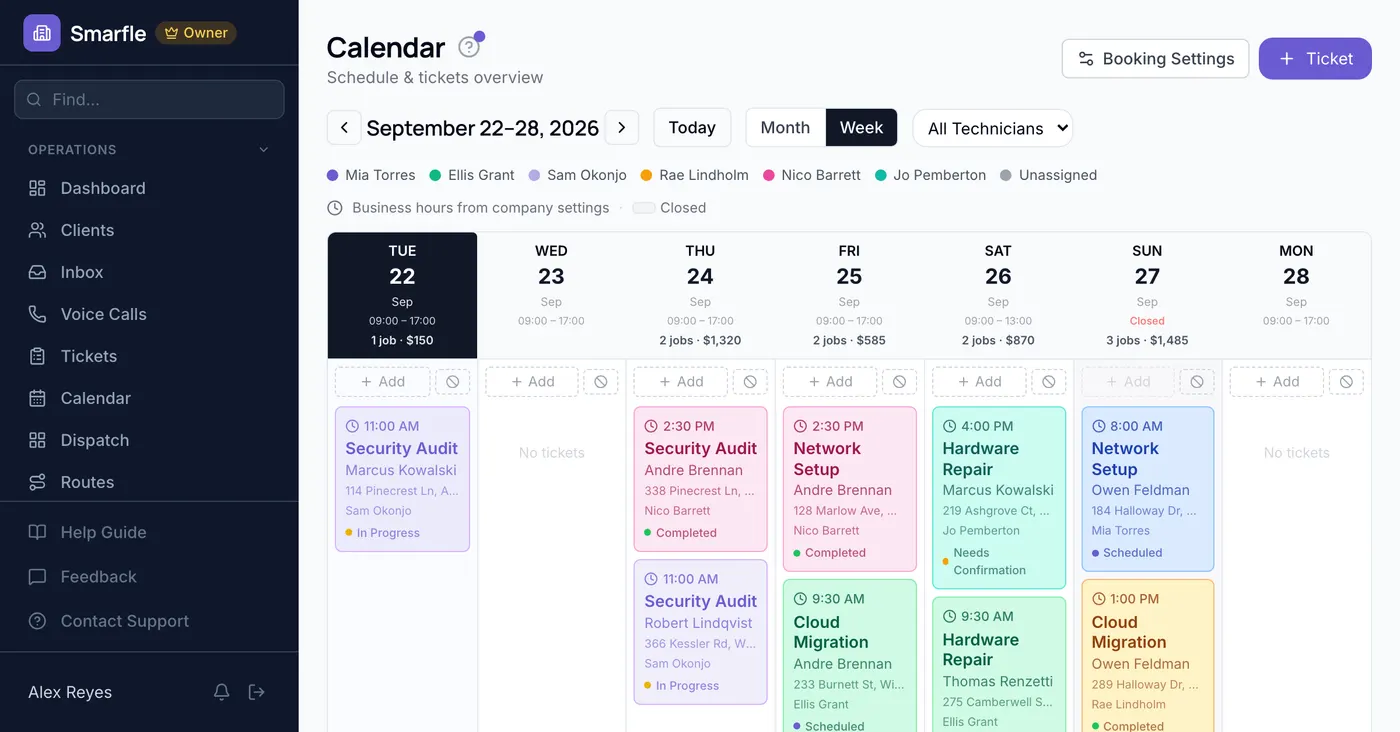
Booking an on-site mails the client something their calendar accepts, so nobody at their end is guessing when an engineer shows up. Coloring by engineer across a month or a single week tells you who is already committed where.
Hardware and contract labor on the ticket
Switches, licenses and contracted engineers are recorded against the project with a rate and a count on each. Gear that came out of your own stock brings its purchase price across, so a migration that looked healthy at quote time cannot hide what it ate.
Label clients by contract, not memory
Managed contracts, break fix holdouts and the sites you only touch on a project basis look identical in a plain client list. Labels you build carry a color of your choosing, attach to any client, and let you view only the ones holding that label.
Get more clients for your MSP
MSP lead generation
An MSP contract is recurring revenue that compounds for years, which makes one good client worth an enormous number of leads. Smarfle finds the businesses in your area actively looking for IT support and sends the company size and the need with the request.
Flat pricing per accepted lead
Managed IT / MSP leads run about $50 each. You see the job and the ZIP first, then accept or pass free. No monthly lead budget, no bidding wars.
When leads start
We expand the directory around every business that joins, and Google needs time to rank new pages, so plan for up to two months before leads ramp up. You pay per lead, never for waiting. A Google Business Profile with real reviews brings them sooner.
Requests arrive pre-qualified
Every quote request already answers how many people on your team and what do you need, so your callback quotes instead of interviews.
Fair by design
Your existing customers and repeat requests are always free, and a bad lead can be disputed with a refund to your wallet.
What MSP owners ask on a demo call
Related industries
Other trades using Smarfle to run their book of business.
Web development agency CRM
B2B tech services on retainers and projects. Same client-portal and recurring-billing model.
ExploreSecurity & alarm CRM
Low-voltage and network overlap. Many MSPs add cameras, access control, and alarm monitoring.
ExploreConsulting CRM
Retainer-based professional services with recurring invoices and a client portal.
ExploreSwitching to Smarfle from another MSP CRM?
Someone on our side sits down with your managed client roster and your service catalog, brings them in from an export, and adds each engineer to the account individually. That person is based in the US and stays with you until the roster reads the way it did before.
Why businesses stay
Who you are buying from
We answer requests the same day. If your business needs a new feature, or an existing one changed, it gets built fast, often by the next day. Ihor Lavrenenko puts his name on this product: he has helped hundreds of local businesses grow, and Smarfle is how that experience shows up in your operation every morning.
Ready to run your managed IT / MSP business from one place?
Join service businesses that book more jobs, get paid faster, and grow their reputation with Smarfle.
14 days free · No credit card · Cancel anytime