Parents informed, invoices sent
Tutoring CRM software
Tutoring CRM software centered on the family rather than the single student. Weekly sessions repeat for each child, progress reports are shared to the family's link, and one invoice covers the household.
Tutoring Business Billing & Invoicing Software in a 2-minute demo of Smarfle. It opens on a parent booking a first math session online, with the grade, the school and the next algebra test date answered.
- From $19/month
- 14-day free trial
- Same-day US support

“We run every customer conversation through Smarfle. Texts, emails and reminders are in one place, our customers love paying with Apple Pay, and when we are busy or closed the text bot answers new leads for us.”
Get the tutoring app


Tutoring software for scheduling and billing
You bill families, not students, and you run weekly sessions all term. Smarfle repeats your sessions, invoices each household once and sends automated reminders.
Tutoring scheduling software
Weekly sessions repeat for each student at the same hour, and families get a reminder the evening before.
Tutoring billing software
Monthly tutoring plans charge the parent's saved card on schedule, each charge with its own invoice.
Tutoring invoicing software
One invoice per family lists every child's sessions, and parents pay by card or Zelle from a payment link.
Tutoring call tracking
Parents call around before exam season. Call tracking ties each call to its source and texts back the ones nobody picked up.
Reviews and GBP
Parents asked for a review after a term build the rating other parents read before booking a first session.
Website and lead follow-ups
Session requests from your website reach the calendar, and package quotes still unsigned get reminders on their own.
Revenue and payment reports
See revenue, payments and lead sources for the whole business or for each branch.
Paid by card or Apple Pay
Text the invoice and the customer pays in a tap. Saved cards can be charged when the work is done.
Tutoring CRM plans that grow with your center
All plans include a 14-day free trial. No credit card required.
Starter
Small teams adding tools and growth
$99/mo
- Up to 5 users (1 owner + 4 techs)
- Up to 2,000 clients
Most Popular
Professional
Growing service businesses
$199/mo
- Up to 10 users
- Up to 5,000 clients
SMS, email, AI, and voice are billed pay-as-you-go. See every plan and usage rate →
Estimate your monthly bill
Your team, clients and jobs, with texts, emails and calls at their real rates.
Your business
Move the sliders. Nothing is sent anywhere and no email is asked for.
Assumes each job sends 2 texts out, gets 1 reply back and 2 emails, and that a tracked call runs 3.5 minutes. Text more than that and you pay more; text less and you pay less. Nothing here is an allowance you lose.
Your estimate
Recommended plan
Starter$99/mo
Usage this month
- 120 texts out× $0.03 = $3.60
- 60 replies in× $0.03 = $1.80
- 120 emails× $0.01 = $1.20
About $1.76 per job
14 days free, no card needed
Three tutoring business problems Smarfle fixes
Siblings billed separately
One parent record carries every child, and one invoice lists each child's sessions as its own line.
Reminder calls before every session
Families get a text or email reminder before each session, so the office stops making those calls.
Blocks of sessions on paper
Sell a block of ten paid upfront, and each finished session uses one, so the family record shows how many are left.
Four ways to answer tutoring calls
Choose how your number answers while tutors are in sessions. Unanswered calls get a text or the AI, and the record of each call sits on the family.
Plain forwarding
$0.04/min
Rings your phone, and every call is logged as answered or missed.
Forward with call tracking
$0.10/min
Rings your phone; calls are recorded, transcribed and saved to the customer.
Busy message and text-back
~$0.05/call
Plays your message, then texts the caller. Replies land in your Inbox.
AI receptionist
$0.25/min
The AI answers, qualifies the caller and books the job, day or night.
Spam screening comes with every mode. Unknown callers press a key before the call connects, and screened calls cost nothing. How spam screening works
Curious how the AI option sounds? Call (866) 355-9645 and try booking a consultation with it.
How a tutoring family flows through Smarfle
How a family and its students join and stay for the term.
- 1
Parent calls
A call, text or booking becomes a family record with the first session booked.
- 2
Weekly time set
Each child's session repeats on the calendar at the same hour all term.
- 3
Tutoring session
The tutor sees the day's sessions in order on their phone or laptop.
- 4
Notes kept
Office notes and the next topic go on the session, readable by the next tutor.
- 5
Family billed
The family's saved card is charged, or one invoice for all children goes out.
Tutors and centers Smarfle fits
Independent tutors and tutoring centers that bill families directly.
A good fit if
- Siblings get separate invoices and confused parents.
- The office calls families before every session.
- Blocks of sessions are tracked on paper.
Probably not a fit if
- You need a school management or grading system.
- You need district-level student data agreements.
- You need lesson content or homework tools.
Everything Smarfle does for a tutoring business
No-login page for every family
Parents open one link with sessions, invoices and receipts for every child, and pay or add a card there.
Progress notes shared by file
Upload a progress report to the family's private folder and share it, so parents open it from their link.
Referral links parents share
Each family gets a referral link, and a friend who books through it is logged under them with your reward.
Families on one record
Tutor management features for the front office
A tutoring center's admin is mostly families and hours. Tutor calendars, counted hours, saved emails and second-parent copies keep both straight.
Every tutor on one calendar
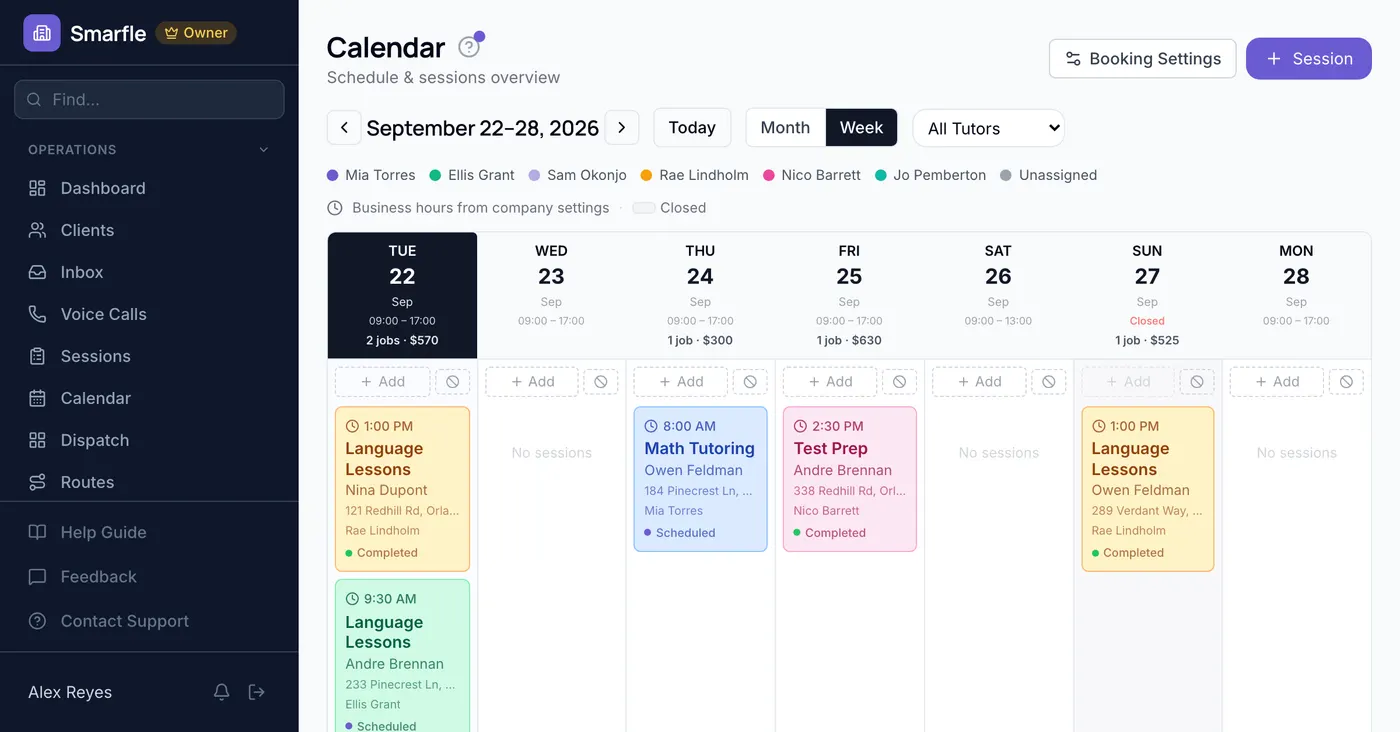
Each tutor has a color on the calendar, so open hours across the center show at a glance.
Tutor hours counted
Tutors log minutes on each session at their hourly rate, so you see what each tutor's time costs.
Term-start emails you stop retyping
Save the welcome and term-start emails as templates with merge fields, and send one in two taps.
Copies for the second parent
Add a second parent as a contact, and they get email copies of invoices and session updates.
Get more students for your tutoring business
Tutoring lead generation
Students who stay for a school year are recurring revenue from one inquiry. Smarfle finds the parents searching in your area and sends the subject and the grade level with the request, so you know whether you have the right tutor before you reply.
Flat pricing per accepted lead
Tutoring leads run about $20 each. You see the job and ZIP first, then accept or pass free, with no lead budget or bidding.
When leads start
Google needs time to rank the pages we add around you, so plan for up to two months. You pay per lead, never for waiting.
Requests arrive pre-qualified
Each request comes with the customer's answers to “What subject?” and “What level?”, so your callback quotes the job instead of interviewing.
Fair by design
Your existing customers and repeat requests are always free, and a bad lead can be disputed for a wallet refund.
Questions owners ask about tutoring management software
Is this a school management system?
We work with schools and districts. Is student data handled to their standard?
How does it stack up against TutorCruncher or Teachworks?
Can a tutor see what families pay?
How is a center with twelve tutors priced?
Can families book online?
Do our tutoring invoices sync with QuickBooks?
Can I text all families when the center closes?
Related industries
Other appointment-based businesses with a similar workflow.
Counseling CRM
Weekly sessions billed directly to clients.
Personal training CRM
Recurring sessions sold as monthly packages.
Consulting CRM
Hourly advice billed from time logged per engagement.
Switching to Smarfle from other tutoring software?
Your families, subjects as services and past sessions are imported for you, and each tutor then gets a login.
- Comes across
- Clients, services with prices, and past appointments with their dates and prices.
- Set up fresh
- Recurring plans and saved cards, since card numbers never move between systems.
- Stays in your old system
- Past invoices, so export them as a file before you cancel.
Why businesses stay
Who you are buying from

Ihor Lavrenenko, founder of Smarfle and author of Rank, Ring, Repeat, a local SEO guide for business owners, puts his name on this product after helping hundreds of local businesses grow. Ask for a feature or a change and it is often built by the next day.
- Rathly LLC, Orlando, Florida
- Patent pending
- Same-day support answers
Try Smarfle free for 14 days
No credit card. Import your families and book the next lesson today.
14 days free · No credit card · Cancel anytime