Counseling CRM software
Counseling CRM software that takes the admin off your evenings by putting booking and rescheduling online and sending session invoices without being asked.
34
28
$6,800
4
Client A.
Individual Therapy Session
Client B.
Intake Assessment
Client C.
Couples Counseling Session
Client D.
Follow-Up Session
Software a counseling practice runs on
Admin follows you home because there is nobody else to hand it to. Booking and rescheduling happen online, new clients move through the same intake every time, and session invoices send themselves. Smarfle does that for a private practice or a group of twelve.
Counseling scheduling software
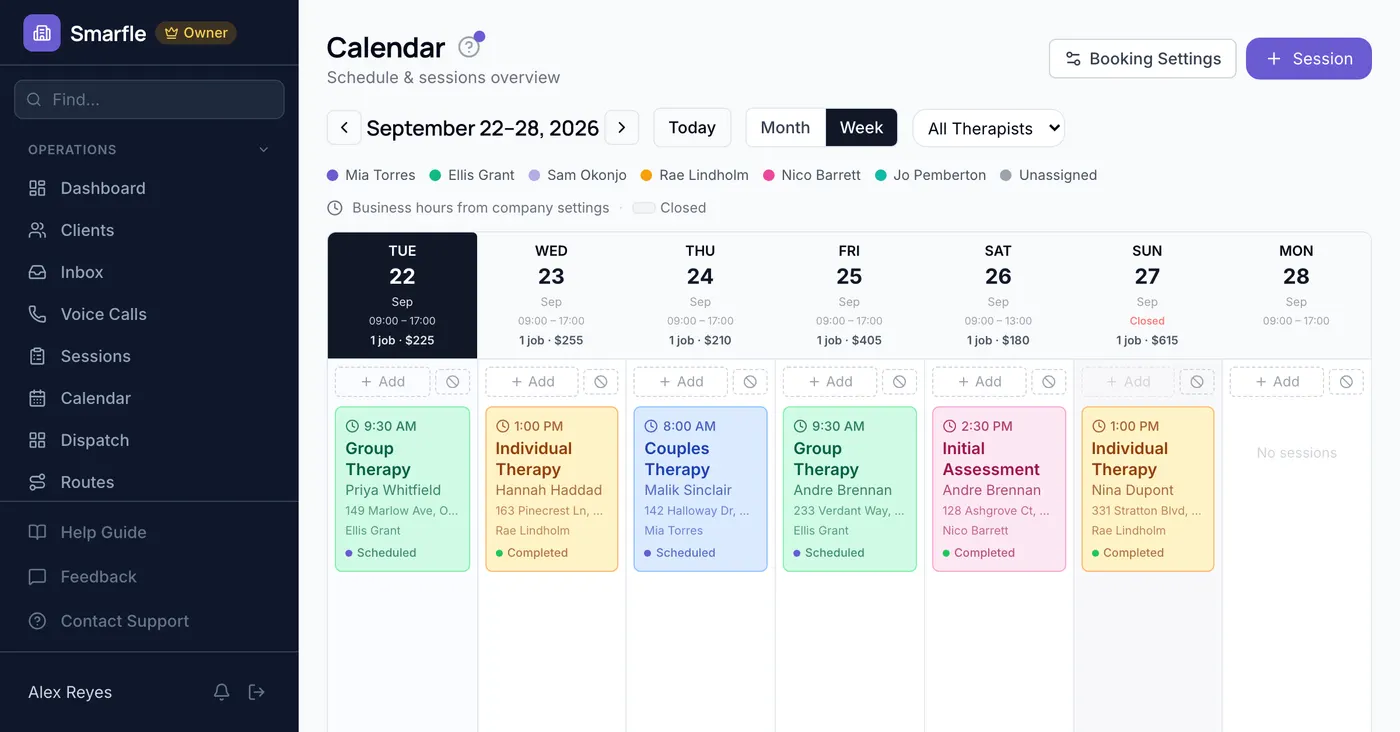
The same hour every week is part of the clinical work, and it has to survive breaks, cancellations and a caseload that never stops shifting. Smarfle keeps the slot standing for as long as the client needs it and lets them move it themselves rather than leaving messages between sessions.
Learn moreCounseling billing software
Your cash-pay clients buy blocks of sessions and the count lives in a notebook. Smarfle holds the block on the client, so both of you can see what remains without a conversation that belongs outside the room.
Learn moreCounseling invoicing software
You do not want an administrative document arriving after every session. Smarfle invoices across a period with the sessions listed and the agreed rate held on the client, so a sliding scale is visible and the billing stays out of the room.
Learn moreThe growth side, built in
Counseling inquiry tracking
A first call to a counselor takes courage, and a missed one rarely comes back. Call logging plus a gentle text-back keeps that door open.
Reviews and Google Business Profile
Prospective clients read reviews carefully before reaching out. A well-kept profile with discreet testimonials lowers the barrier to that first call.
Website and lead follow-ups
Private inquiry forms feed intake without phone anxiety, and confirmation follow-ups reduce first-session no-shows.
CRM plans that grow with your counseling practice
All plans include a 14-day free trial. No credit card required.
Solo
Sole operators getting started
- 1 user
- Up to 500 clients
- 1 GB storage
- Public booking link + calendar
- Client management
- Work orders with photos
- Invoices + Stripe payments
- Voice AI receptionist (usage-based)
- AI drafts + work order summaries
- GMB rank tracking + Search Console
- GBP Posts + Dashboard
- API access + webhooks
- Mobile PWA + CSV import/export
Starter
Small teams adding tools and growth
- Up to 5 users (1 owner + 4 techs)
- Up to 2,000 clients
- 3 GB storage
- 2 branch locations
- Everything in Solo
- Website builder + AI content
- Your own domain on that website
- Branded client portal
Professional
Growing service businesses
- Up to 10 users
- Up to 5,000 clients
- 5 branch locations
- 10 GB storage
- Everything in Starter
- Manager role (up to 2)
- 50 saved email templates
Business
Multi-location operations
- Up to 30 users
- Up to 10,000 clients
- 10 branch locations
- 20 GB storage
- Everything in Professional
- Manager role (up to 5)
- Priority support
SMS, email, AI, and voice are billed pay-as-you-go. See full pricing breakdown →
What an inefficient counseling practice looks like
A private practice has no back office, so the back office is you, after hours, on the evenings that were supposed to be yours.
Scheduling and rescheduling eats your evenings
Clients cancel, reschedule, and request new times constantly. Without self-service booking, every change requires a phone call or email exchange. You spend your evenings coordinating next week's schedule instead of resting between sessions.
Intake and onboarding is inconsistent
New clients need intake assessments, consent forms, and scheduling, but the process varies depending on who handles it. Some clients fall through the cracks between initial contact and first session because the onboarding steps are not tracked systematically.
Invoicing gets delayed or forgotten entirely
When you are between sessions all day, invoicing happens at night or not at all. Late invoices confuse clients, delay payment, and create awkward conversations that undermine the therapeutic relationship.
Every counseling call, handled your way
Calls during a session go to whichever mode you chose for those hours. Nothing reaches you as an interruption and nothing is lost to voicemail.
Plain forwarding
$0.04/min
Just rings your phone. Every call logged as answered or missed.
Forward with call tracking
$0.10/min
Rings your phone. Recorded, transcribed, summarized, and logged to the customer record.
Busy message + text-back
~$0.05/call
Plays your message, hangs up, and texts the caller. Replies land in your Inbox as leads.
AI receptionist
$0.25/min
The AI answers, qualifies the caller, and books the job. Great after hours if you want it.
Spam screening is included in every mode
Turn it on and unknown callers hear one sentence and press a key before the call connects. Dialer software does not press keys, so it never reaches you. How screening works
- Your customers skip it. Known clients and callers on mobile numbers are never screened.
- You are not billed for it. Screened, silent, and blocked calls cost nothing.
- One blocklist. Block a number once and it stops calling and texting.
Curious how the AI option sounds? Call (866) 355-9645 and try booking a consultation with it.
How a therapy engagement flows through Smarfle
An intake call becomes a client on a recurring schedule, billed without an evening spent on it.
- 1
Intake call comes in
Intake calls are captured by whichever mode covers that hour, and web enquiries arrive alongside them. Insurance and presenting concerns land on the record.
- 2
Initial session booked
Calendar slot held, intake forms via client portal, confirmation SMS sent.
- 3
Recurring sessions scheduled
After intake, recurring work orders auto-generate weekly or biweekly sessions. Custom fields track treatment modality and goals.
- 4
Sessions + notes logged
Session notes attached to the client record, time tracking against billable hours, progress against treatment plan.
- 5
Bill + insurance + review
Auto-invoice for each session via Stripe payment link, review request at termination, maintenance reminders for any follow-up.
Same flow for every counseling business, only the terminology and details change.
Smarfle is not right for every counseling practice
Recurring sessions and your own billing are the dividing line. Agency-employed work will need less.
We built this for you if...
Tap the ones that resonate
This probably isn't for you if...
And that's okay
Everything Smarfle does for a counseling practice
The sessions are your work. Scheduling them, billing them, and keeping the practice full should not follow you home. These take all three off your evenings.
Client self-booking
Clients view your available slots and book sessions directly. Recurring appointments repeat weekly without requiring re-confirmation each time.
SMS session reminders
Professional, brief reminders go out before each session. Configurable messaging ensures the tone matches your practice standards.
Intake tracking
Track where each new client is in the onboarding process. No one falls through the cracks between initial contact and first session.
Caseload visibility
See your weekly session count and capacity at a glance. Know when you have room for new clients and when your caseload is full.
Counseling CRM details for a solo practice
You are the one who knows which client came from which referral source, who has been rescheduled twice, and who is still holding for a slot. Nothing in that list is clinical. None of it should depend on your memory either. Tags, notes and a time stamped trail keep all of it with the record, so the practice owns it rather than one person.
Everything administrative about a client can sit on the record without a single clinical detail going near it.
Referral source and waitlist, at a glance
Referral source, who is waiting for an opening and who is on a sliding scale tend to live in one person's head. Turn each into a colored label you write yourself, place it on the client, and your list shortens to only that category.
When the fee changed, and by whom
A client asking when a fee or a cadence changed is something you should be able to read back word for word. Your client history keeps notes in order beside status changes recorded without you, every line showing the person and the moment.
Fee agreements filed under the client
The practice policy a client put their name to, the fee agreement and any sheet they returned by hand go into folders beneath that client, closed to anybody outside the practice. Open a single one and they reach it through a link written for them, with 25 MB of headroom on each file.
One message to a chosen group
Merge fields drop each client's own details into the text, so an announcement about hours or fees does not read like a form letter. You pick who receives it by status, label and location, and afterwards you can see which texts were delivered.
Get more clients for your counseling practice
Counseling lead generation
Weekly therapy is a relationship measured in months, not a single appointment. Smarfle finds the people looking for support in your area and sends what they are seeking help with, so you can tell whether it fits your practice before you respond.
Flat pricing per accepted lead
Counseling leads run about $35 each. You see the job and the ZIP first, then accept or pass free. No monthly lead budget, no bidding wars.
When leads start
We expand the directory around every business that joins, and Google needs time to rank new pages, so plan for up to two months before leads ramp up. You pay per lead, never for waiting. A Google Business Profile with real reviews brings them sooner.
Requests arrive pre-qualified
Every quote request already answers who is this for and how do you want to meet, so your callback quotes instead of interviews.
Fair by design
Your existing customers and repeat requests are always free, and a bad lead can be disputed with a refund to your wallet.
Private practice therapists ask us this
Related industries
Other trades using Smarfle to run their book of business.
Switching to Smarfle from other counseling software?
Client names, phone numbers and the billing you invoice from move over, and every clinical note stays exactly where it lives today. A person in the United States prepares that import from what you export and creates each therapist login by hand, so your caseload keeps running through the week you switch.
Why businesses stay
Who you are buying from
We answer requests the same day. If your business needs a new feature, or an existing one changed, it gets built fast, often by the next day. Ihor Lavrenenko puts his name on this product: he has helped hundreds of local businesses grow, and Smarfle is how that experience shows up in your operation every morning.
Ready to run your counseling business from one place?
Join service businesses that book more jobs, get paid faster, and grow their reputation with Smarfle.
14 days free · No credit card · Cancel anytime